

Portable storage has come a long way. Not too long ago, carrying a terabyte of data meant lugging around a fragile, spinning hard drive that took two minutes just to move a raw video file. Today, you can slip a drive smaller than a credit card into your pocket and transfer 4K ProRes footage at speeds that would have embarrassed most internal SSDs from five years ago.
The shift to SSDs changed everything for professionals and regular users alike. Whether you’re a filmmaker offloading raw footage at a remote location, a gamer expanding your console’s storage library, a photographer backing up a wedding shoot, or someone who just wants faster, more reliable backups, a good portable SSD makes a real difference in your day-to-day workflow.
But here’s the thing: the market has exploded with options, and not all of them live up to the marketing hype. USB4 drives that throttle under sustained workloads, rugged enclosures that crack under pressure, and Thunderbolt drives that only perform well on the latest Macs there’s a lot to navigate.
In this guide, we’ve reviewed five portable SSDs that represent the current state of the art in 2026. They range from versatile USB4 drives built for travel to hardcore Thunderbolt 5 powerhouses designed for professional video production. We tested real-world transfer performance, thermal behavior, build quality, and value for money so you can make a smart buying decision.
The five drives covered in this guide are:
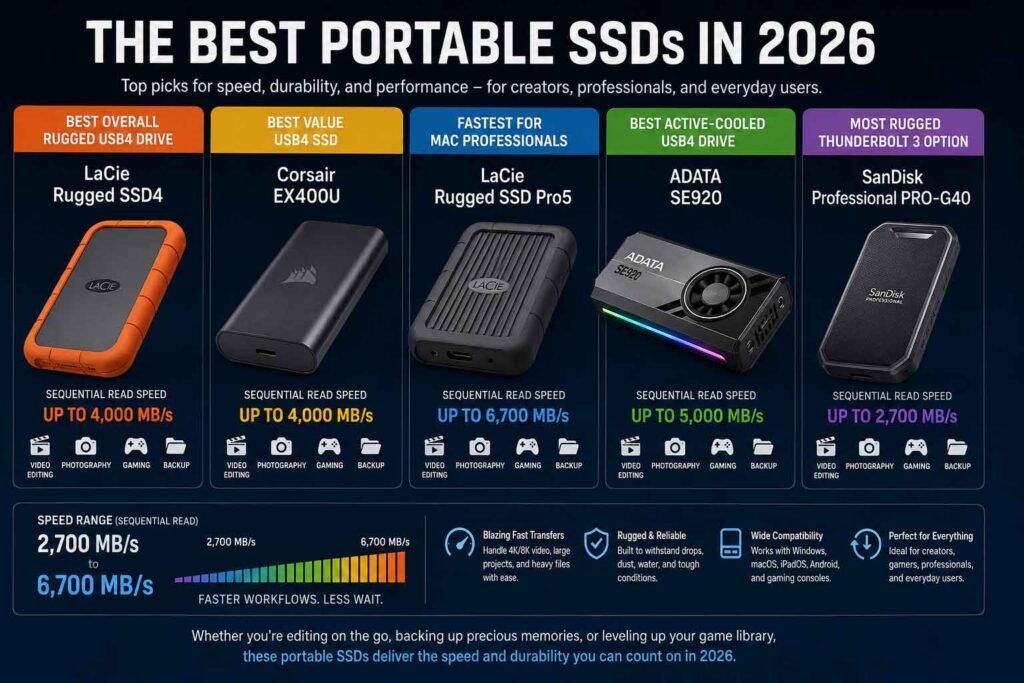
- LaCie Rugged SSD4 a rugged USB4 drive balancing speed and durability
- Corsair EX400U a compact, MagSafe-compatible USB4 SSD at a competitive price
- LaCie Rugged SSD Pro5 the fastest portable drive on the planet for Thunderbolt 5 systems
- ADATA SE920 a USB4 drive with a clever built-in active cooling system
- SanDisk Professional PRO-G40 a proven Thunderbolt 3 workhorse with IP68 protection
Let’s get into it.
Quick Comparison Table
| Drive | Best For | Interface | Max Read | Max Write | Capacities | Durability | Price Range | Rating |
|---|---|---|---|---|---|---|---|---|
| LaCie Rugged SSD4 | Best overall rugged USB4 | USB4 40 Gbps | 4,000 MB/s | 3,800 MB/s | 1–4 TB | IP54, 3m drop | $$ | 9/10 |
| Corsair EX400U | Best value USB4 | USB4 40 Gbps | 4,000 MB/s | 3,600 MB/s | 1–4 TB | Basic casing | $ | 8.5/10 |
| LaCie Rugged SSD Pro5 | Best for Mac professionals | Thunderbolt 5 | 6,700 MB/s | 5,300 MB/s | 2–4 TB | IP69, 3m drop | $$$$ | 9.5/10 |
| ADATA SE920 | Best active cooling | USB4 40 Gbps | 3,800 MB/s | 3,700 MB/s | 1–4 TB | Basic casing | $$ | 8/10 |
| SanDisk PRO-G40 | Best rugged Thunderbolt 3 | Thunderbolt 3 / USB 3.2 | 3,000 MB/s | 2,500 MB/s | 1–4 TB | IP68, 3m drop | $$$ | 8.5/10 |
What to Look for Before Buying a Portable SSD
Before spending money on an external SSD, it’s worth understanding what actually matters versus what’s just a spec sheet number. Here’s a breakdown of every factor worth considering.
Read & Write Speeds
Sequential read and write speeds are the headline numbers manufacturers love to advertise. They determine how fast you can move large files raw video, database backups, game installations. For video editors working with 4K ProRes or 8K RAW, you’ll want at least 2,000 MB/s sustained write speed. For everyday use, 1,000 MB/s is more than sufficient.
That said, peak speeds measured in controlled benchmarks rarely match real-world performance. Always look for sustained write data, not just burst figures.
USB 3.2 vs USB4 vs Thunderbolt
These interfaces define the speed ceiling your drive can achieve.
USB 3.2 Gen 2 tops out around 1,000 MB/s fine for casual use, but limiting for large file transfers. USB 3.2 Gen 2×2 doubles that to roughly 2,000 MB/s, though Mac compatibility has historically been inconsistent with this standard.
USB4 (40 Gbps) is the current mainstream sweet spot for portable SSDs. It delivers theoretical bandwidth of 5 GB/s, enabling real-world sequential speeds above 3,500 MB/s. It’s also fully compatible with Thunderbolt 4 ports, which means it works great on both modern Macs and new Windows systems.
Thunderbolt 3 operates at the same 40 Gbps as USB4 but uses Intel’s protocol, which brings latency benefits for storage. Thunderbolt 5 (the newest standard) doubles bandwidth to 80 Gbps in one direction, enabling sequential reads approaching 7,000 MB/s on compatible hardware. The catch? Thunderbolt 5 ports are still limited to recent Macs with M4 Pro/Max chips and a handful of high-end Windows laptops.
Real-World vs Benchmark Performance
A drive that scores 4,000 MB/s in CrystalDiskMark may drop to 1,500–1,800 MB/s when you’re copying a folder of mixed-size files. This is normal the SLC cache fills up, and the drive falls back to writing directly to TLC NAND. Drives with larger caches and better controllers handle sustained workloads more gracefully.
Capacity Options
For most users, 1 TB or 2 TB is the sweet spot. Content creators working with 4K/8K footage may need 4 TB. If you’re storing game libraries, 2 TB is a practical minimum for modern titles. Check whether the drive’s price per terabyte is competitive at the capacity you actually need.
NAND Flash Type
TLC (Triple-Level Cell) NAND is standard in most premium portable SSDs it’s fast, reasonably durable, and cost-effective. QLC (Quad-Level Cell) NAND is cheaper and offers higher density but with lower endurance. For professional use, TLC is the better choice.
Sustained Performance and Thermal Management
Heat is the enemy of sustained SSD performance. When a drive gets hot, it throttles to protect itself, and your transfer speeds crater. Drives with aluminum enclosures dissipate heat better than plastic ones. A few drives like the ADATA SE920 go further and include active cooling fans. For long, heavy workloads, thermal management can be the difference between consistent performance and unpredictable slowdowns.
Ruggedness
For field work, consider IP ratings: IP54 means dust protection and splash resistance. IP68 is the gold standard full dust-proof and submersion-resistant. Drop protection from 3 meters is common among purpose-built rugged drives. If you work outdoors, a proper IP rating and shock-tested construction are non-negotiable.
Compatibility
Check whether the drive works with your specific setup: Windows, macOS, Linux, PlayStation 5, Xbox Series X/S. Most modern USB4 drives handle all of these, but Thunderbolt 5 drives have stricter requirements. Some drives ship pre-formatted for macOS (HFS+), others use exFAT for cross-platform use out of the box.
Encryption and Security
Hardware encryption (AES-256) protects your data if the drive is lost or stolen. Not all drives support it notably the SanDisk PRO-G40 uses a drive without hardware encryption support. If data security is important to your workflow, confirm this before buying.
Software and Warranties
Good companion software makes backups and drive management easier. Warranties matter for a device you’re subjecting to field conditions 3 years is standard, 5 years is excellent. Some LaCie drives include Seagate’s Rescue Data Recovery service, which adds meaningful peace of mind.
Our Top 5 Portable SSD Picks
1. LaCie Rugged SSD4
Overview
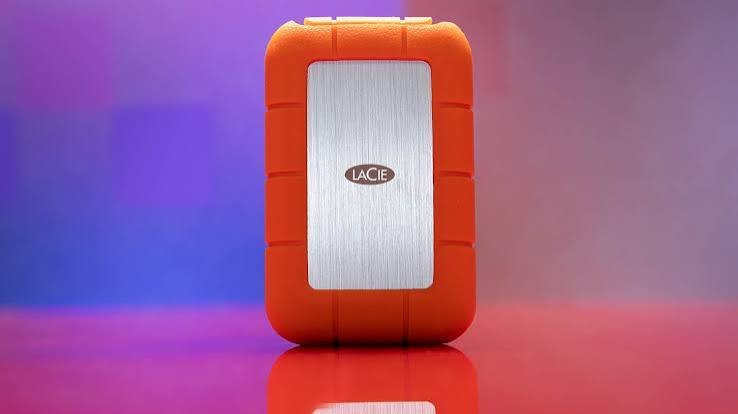
The LaCie Rugged SSD4 is LaCie’s answer to the question: “What if a drive was fast enough for serious professional work and tough enough to survive field conditions?” The answer wears a bright orange rubber bumper and runs over USB4 at 40 Gbps. It’s not the cheapest USB4 option on the market, and it won’t break any speed records when connected to a Thunderbolt 5 system. But for a drive that works reliably across Mac, Windows, iPad, and even iPhone with protection you can trust it’s one of the most compelling portable SSDs available right now.
Key Specifications
| Spec | Details |
|---|---|
| Interface | USB4 40 Gbps (USB-C) |
| Max Sequential Read | 4,000 MB/s |
| Max Sequential Write | 3,800 MB/s |
| Capacities | 1 TB, 2 TB, 4 TB |
| Dimensions | 105 × 67 × 18 mm |
| Weight | ~109 g |
| IP Rating | IP54 |
| Drop Protection | 3 m |
| Crush Resistance | 1 ton |
| Warranty | 3 years + Seagate Rescue Data Recovery |
| Compatibility | macOS, Windows, iPadOS, iOS, Android |
| Included Cable | USB-C 40 Gbps (orange, ~30 cm) |
| Price | $119.99 (1 TB) / $214.99 (2 TB) / $399.99 (4 TB) |
Design and Build Quality
The LaCie Rugged SSD4 inherits the iconic design that’s kept LaCie drives recognizable for two decades the signature orange rubber bumper wrapped around a brushed aluminum interior shell. Veteran LaCie users will feel right at home. The drive is compact enough for a jeans pocket at 105 × 67 × 18 mm and weighs just 109 grams.
Inside the NVMe PCIe Gen 4 SSD benefits from the aluminum core, which acts as a passive heatsink during sustained transfers. The one design quirk worth mentioning is the loose rubber plug that covers the USB-C port. It’s not tethered to the drive, which means it’s the kind of thing you’ll misplace in a camera bag. It’s a minor annoyance on an otherwise excellent physical design.
Performance and Speed
The Rugged SSD4 runs on the USB4 40 Gbps standard, and when connected to a compatible USB4 or Thunderbolt 4 port, it delivers sequential reads just above 4,000 MB/s and sequential writes in the 3,600–3,800 MB/s range. That places it right at the top of the USB4 portable SSD market.
Real-world benchmarks from multiple review outlets confirm performance near those peaks. Tom’s Hardware testing on an AMD Ryzen-based USB4 platform showed sequential reads consistently exceeding 4,000 MB/s. TweakTown’s testing on a Thunderbolt 5-capable system placed the Rugged SSD4 as the second-fastest portable SSD they’d ever tested, trailing only LaCie’s own Pro5.
Drop the interface to USB 3.2 Gen 2, and you’re looking at around 1,000 MB/s the drive still works fine, but you won’t see any of the USB4 magic.
Real-World File Transfer Performance
LaCie confirms that write speeds begin at near-peak for the first 4% of the drive’s capacity, then settle into a sustained range of 850–1,750 MB/s once the SLC cache is exhausted. PC Perspective’s real-world large file transfer tests saw initial bursts near 4,000 MB/s that settled to a steady 1,500–1,700 MB/s range solid for a drive of this class. For 4K ProRes transfers and RAW photography offloads, this is more than sufficient.
Thermal Performance
LaCie engineered the enclosure to avoid thermal throttling in ambient temperatures up to 35°C. The aluminum shell acts as a passive cooler, and the drive manages heat effectively enough that most users won’t encounter throttling during typical transfer sessions. Sustained large writes over multiple hours could be a different story, but for the use cases this drive targets field transfers and professional offloads thermal performance holds up.
Durability and Rugged Features
IP54 protection covers dust resistance (no full ingress protection) and splash resistance from any direction adequate for field work but not for submersion. The drive is tested to survive 3-meter drops and withstand one ton of static pressure. For a wildlife photographer, a documentary filmmaker, or a travel content creator, these specs translate to real-world confidence. Seagate builds it with at least 35% recycled materials by weight, which is a thoughtful environmental touch.
Compatibility
This is one of the Rugged SSD4’s strongest cards. The USB4 interface means it works natively with Thunderbolt 5, Thunderbolt 4, Thunderbolt 3, USB4, and older USB 3.x standards covering essentially everything with a USB-C port. It ships in exFAT format for immediate cross-platform use with macOS, Windows, iPadOS, iOS, and Android.
LaCie doesn’t require any driver installation, and the drive showed consistent performance across macOS and Windows in testing.
Security Features
The Rugged SSD4 supports AES-256 hardware encryption via the LaCie Toolkit software, giving you meaningful data security for sensitive field work.
Software and Utilities
Pre-installed software links launch the LaCie Toolkit, which provides backup, sync, and secure erase functionality. Registering the drive also unlocks a 2-month Adobe Creative Cloud Pro trial a nice bonus for creative professionals who might not already be subscribers.
Pros
- Excellent sustained USB4 performance
- Class-leading rugged protection for a USB4 drive
- Works seamlessly across Mac, Windows, iOS, and Android
- 3-year warranty with Seagate Rescue Data Recovery
- Compact, field-ready design
Cons
- Detachable port cover is easily lost
- Noticeably more expensive than the Corsair EX400U
- Slightly slower than the Pro5 in all tests (by design different interface)
- At USB 3.2 speeds, the premium isn’t justified
Best For
Photographers, documentary filmmakers, and content creators who need both high-speed USB4 transfers and meaningful field protection. Also excellent for Mac users who want a fast backup drive without paying for full Thunderbolt 5 hardware.
Who Should Avoid It
Users without USB4 or Thunderbolt 4/5 ports will pay a premium they can’t fully utilize. Budget shoppers can get very similar USB4 performance from the Corsair EX400U for significantly less money.
Final Verdict
The LaCie Rugged SSD4 earns its price premium through the combination of genuine field durability and true USB4 performance. It’s not the absolute fastest portable SSD, and it’s not the cheapest USB4 option. But it threads the needle well between speed, protection, and cross-platform compatibility. For professionals who work outside studio conditions, it’s hard to recommend anything else in the USB4 category. 9/10
2. Corsair EX400U USB4 External SSD
Overview
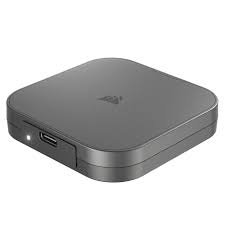
Corsair is better known for PC components than portable storage, but the EX400U makes a compelling first impression. It’s a compact, square USB4 drive that pairs top-tier transfer speeds with a MagSafe-compatible magnetic ring a genuinely clever feature that lets you clip it directly to the back of an iPhone for direct-to-drive recording. At a more accessible price point than the LaCie Rugged SSD4, it’s emerged as one of the most popular USB4 SSDs on the market.
Key Specifications
| Spec | Details |
|---|---|
| Interface | USB4 40 Gbps (USB-C) |
| Max Sequential Read | 4,000 MB/s |
| Max Sequential Write | 3,600 MB/s |
| Controller | Phison PS2251-21 (native USB4) |
| NAND | 3D TLC (Kioxia) |
| Capacities | 1 TB, 2 TB, 4 TB |
| Dimensions | 64 × 64 × 12 mm (approx.) |
| Weight | ~49 g |
| IP Rating | None |
| Warranty | 3 years |
| Compatibility | macOS, Windows, iPadOS, iOS, Android, ChromeOS |
| Included Cable | USB4 braided (40 Gbps, 240 W PD, ~30 cm) |
| Price | $109 (1 TB) / $179 (2 TB) / $309 (4 TB) |
Design and Build Quality
The EX400U takes a different approach to design than the LaCie drives. It’s a square gunmetal chassis with an aluminum top surface and plastic sides noticeably smaller than the LaCie Rugged SSD4 at roughly half the footprint. On the underside sits the signature magnetic ring, which is MagSafe-compatible and strong enough to hold the drive securely against a phone or a metal surface like a PC chassis.
The build quality is good rather than exceptional. The aluminum top feels premium, but the plastic sides give it a slightly less substantial feel than aluminum-bodied competitors. There’s no IP rating or rugged protection to speak of this is a speed-focused drive in a compact package, not a field-tested survivor.
The included braided USB4 cable supports 40 Gbps data transfer and 240 W power delivery, which is a thoughtful inclusion.
Performance and Speed
At the heart of the EX400U is Phison’s PS2251-21 controller the first native USB4 controller to market, meaning no bridging chip is required. This architecture keeps the design compact and allows the controller to extract maximum performance from the interface.
In real-world testing, multiple outlets confirmed sequential reads exceeding 4,000 MB/s and writes between 3,500–3,700 MB/s on a USB4 40 Gbps connection. NotebookCheck’s benchmarks using diskspd sequential reads even exceeded the advertised 4,000 MB/s figure. It also delivered strong compatibility results, working flawlessly on macOS, iPadOS, ChromeOS, iOS (for ProRes recording directly to the SSD on iPhone 16 Pro), and Windows 11.
Real-World File Transfer Performance
Tom’s Hardware found the EX400U edged out the LaCie Rugged SSD4 in several real-world CrystalDiskMark tests on a Windows platform. For users without Thunderbolt 5, the EX400U provides USB4 performance that’s essentially competitive with the Rugged SSD4 at a meaningfully lower price. Large file transfers of 100 GB moved quickly, with sustained write rates in the 1,500–2,000 MB/s range once the cache was filled.
Thermal Performance
One of the EX400U’s noted weaknesses is heat. NotebookCheck specifically flagged “high heat development under load” as a disadvantage, and with no active cooling or particularly effective passive heatsink structure, the drive can get warm during extended high-throughput transfers. For short-burst workflows like offloading camera cards, this rarely matters. For sustained large-file writes over many minutes, thermal throttling is a realistic possibility.
Durability and Rugged Features
There’s no IP rating, no stated drop protection, and no rugged bumper. This is a clean-room, studio, or daily-carry drive. It’ll handle the knocks of a backpack without issue, but it’s not designed for rough field conditions.
Compatibility
Excellent arguably the best in this roundup for breadth of compatibility. The EX400U’s MagSafe ring enables features that no other drive in this list can match: direct-to-drive iPhone recording in ProRes, seamless attachment to the back of a Samsung Galaxy for Android file transfers, and magnetic mounting to steel PC cases during transfers. NotebookCheck confirmed native compatibility with macOS 26, iPadOS 26, ChromeOS, iOS (iPhone 16 Pro), and Windows 11.
Security Features
The EX400U supports hardware encryption via the Corsair SSD Toolbox software, though detailed hardware encryption specifications weren’t prominent in Corsair’s documentation.
Software and Utilities
Corsair SSD Toolbox provides S.M.A.R.T. monitoring, firmware updates, drive information, and secure erase functionality. It’s not the most polished utility in the category, but it covers the essentials.
Pros
- Excellent USB4 performance at a competitive price
- MagSafe ring is genuinely useful for smartphone workflows
- Very compact and lightweight at ~49 g
- Strong cross-platform compatibility including ChromeOS
- Native USB4 controller (no bridging chip)
Cons
- No IP rating or rugged protection
- Runs hot under sustained heavy workloads
- TBW rating of 1,000 TB (4 TB model) is on the lower end
- Short cable length can be awkward for desktop use
Best For
Content creators who record directly from smartphones, users who want maximum USB4 speed at the most accessible price, and anyone who values extreme portability over rugged protection. Also a strong choice for users who move between Windows, Mac, iPad, iPhone, and Android regularly.
Who Should Avoid It
Anyone working outdoors or in harsh conditions should look elsewhere there’s no rugged protection here. Users who need long, sustained high-speed writes should be aware of the thermal constraints.
Final Verdict
The Corsair EX400U punches well above its price point. The MagSafe integration is more than a gimmick it opens up meaningful iPhone and smartphone workflows that no other drive in this lineup offers. The lack of rugged protection keeps it from being a universal recommendation, but for studio and travel use, it’s the best value USB4 SSD on the market. 8.5/10
3. LaCie Rugged SSD Pro5
Overview
There’s a short answer and a long answer to the question “is the LaCie Rugged SSD Pro5 worth it?” The short answer: if you have a Mac with Thunderbolt 5, yes it’s the fastest portable storage drive on the planet. The long answer involves understanding exactly how niche that use case still is, and what you get if you’re running an older system.
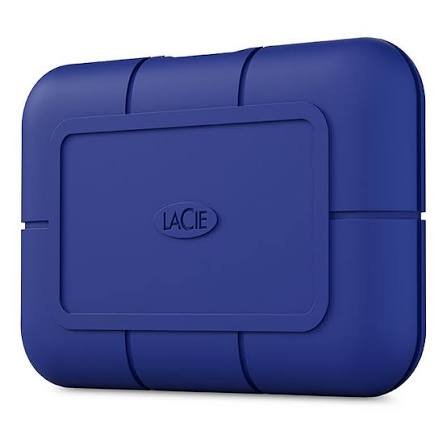
The Pro5 is LaCie’s Thunderbolt 5 flagship, wrapped in the brand’s recognizable rubber enclosure blue this time, distinguishing it from the orange Rugged SSD4. It delivers staggering sequential reads approaching 7,000 MB/s over TB5, and it comes with IP69 protection that makes it one of the toughest drives in this roundup.
Key Specifications
| Spec | Details |
|---|---|
| Interface | Thunderbolt 5 (120 Gbps one-way) |
| Max Sequential Read | 6,700 MB/s (cached) |
| Max Sequential Write | 5,300 MB/s (cached) |
| Sustained Write (Post-Cache) | 1,400–1,800 MB/s |
| Cache Size | 50 GB SLC |
| Capacities | 2 TB, 4 TB |
| Dimensions | 98 × 65 × 17 mm |
| Weight | ~150 g |
| IP Rating | IP69 |
| Drop Protection | 3 m |
| Crush Resistance | 2 tons |
| Warranty | 5 years + Seagate Rescue Data Recovery |
| Compatibility | macOS (TB5/4), Windows 11 (23H2+, TB5 recommended) |
| Included Cable | Thunderbolt 5 (~30 cm) |
| Price | $399.99 (2 TB) / $599.99 (4 TB) |
Design and Build Quality
The Pro5 adopts the same Neil Poulton-designed language as the rest of LaCie’s Rugged family, but in a deep blue rubber that makes it immediately distinguishable in a gear bag. At 150 grams, it’s heavier than the SSD4 the additional IP69 protection and Thunderbolt 5 hardware contribute to that. The enclosure is fully sealed, which is how it achieves maximum dust and water ingress protection, but it means heat has fewer paths to escape, which we’ll address below.
Build quality is excellent. There’s no flex, no cheap materials, and it has the reassuring density of something designed to take punishment.
Performance and Speed
On a Mac with M4 Pro or M4 Max the only mainstream consumer devices with Thunderbolt 5 at time of writing the numbers are genuinely jaw-dropping. Tom’s Hardware recorded sequential reads close to 7,000 MB/s and writes around 5,200 MB/s on an M4 Pro Mac mini. TweakTown’s testing on an Intel Z890 board with Thunderbolt 5 achieved around 6,100 MB/s read and 5,100 MB/s write.
The SLC cache covers 50 GB of writes at peak speed. Once that cache saturates, sustained write speeds settle to 1,400 MB/s (2 TB) or 1,800 MB/s (4 TB). That’s still fast enough for 6K/8K editing workflows, and because the cache is 50 GB, many real-world creative workflows never exhaust it.
On Thunderbolt 4 or USB4 (40 Gbps) systems, the drive functions but is limited to approximately 4,000 MB/s reads and 3,000+ MB/s writes comparable to other 40 Gbps drives. Windows compatibility with non-TB5 systems is notably complex.
Real-World File Transfer Performance
For photographers shooting high-resolution RAW files and videographers working with ProRes 4K/6K/8K, the Pro5 provides a materially better editing experience than any USB4 drive. Editing directly from the drive is smooth because sequential read speeds far exceed what any current video format demands. TweakTown found the Pro5 the single fastest portable storage device they’d tested for reading, beating the Rugged SSD4 by nearly 50% on a Thunderbolt 5 host.
Thermal Performance
The fully sealed rubber enclosure is excellent for waterproofing but creates a thermal tradeoff. Heat generated during sustained operations has limited paths out. In testing, the drive performed well for typical professional transfer sessions, but some reviewers noted occasional write speed variations during prolonged sustained tests. This is worth monitoring if you’re planning extended editing sessions directly from the drive.
Durability and Rugged Features
IP69 is about as good as it gets for portable storage. Unlike the IP54-rated SSD4, the Pro5 is fully dust-proof and can withstand high-pressure water jets not just splashes. Drop protection extends to 3 meters, and crush resistance reaches 2 tons. This is a drive you could confidently use on a film set in rain, in dusty desert environments, or through the kind of accidental abuse that would kill most electronics.
The 5-year warranty (compared to 3 years on the SSD4) also reflects LaCie’s confidence in the hardware’s longevity.
Compatibility
This is the Pro5’s most significant limitation. Thunderbolt 5’s full speed potential is currently accessible mainly on Macs with M4 Pro or M4 Max chips. Windows support is limited to select laptops like the Razer Blade 18 and a small number of Intel Z890 motherboards with TB5 ports. The drive explicitly does not support Thunderbolt 3, and Windows 11 version 23H2 or later is required for PC use.
Tom’s Hardware described the Windows setup experience as “plug-and-pray” on anything other than a TB5 system, which is a meaningful caveat for mixed-platform users.
Security Features
AES-256 hardware encryption is available through LaCie Toolkit, consistent with the rest of the LaCie lineup.
Software and Utilities
LaCie Toolkit provides backup, sync, encryption management, and firmware update functionality. Product registration unlocks one month of Adobe Creative Cloud a smaller bonus than the 2-month offer on the SSD4. The software is solid and well-maintained by Seagate.
Pros
- Fastest portable SSD available period on Thunderbolt 5 systems
- Best-in-class IP69 protection
- 5-year warranty with Rescue Data Recovery
- 50 GB SLC cache sustains peak speed for longer than competitors
- Outstanding for real-time 6K/8K editing workflows on compatible Macs
Cons
- Very expensive, particularly the 4 TB model
- Thunderbolt 5 is still rare in 2026
- Windows compatibility is complex and error-prone without TB5
- Does not support Thunderbolt 3 in Windows
- Requires minimum 15 W PD from connected ports
- Short 30 cm cable
Best For
Professional video editors and photographers using M4 Pro or M4 Max Macs who need the absolute fastest portable storage available. Also suitable for anyone running a Thunderbolt 5-equipped Windows system who needs both extreme speed and field-ready durability.
Who Should Avoid It
Anyone without a Thunderbolt 5 system is paying a significant premium for performance they cannot access. Budget-conscious buyers and Windows users without TB5 should look at the Rugged SSD4 or Corsair EX400U instead.
Final Verdict
The LaCie Rugged SSD Pro5 is a technical tour de force that sits at the leading edge of what portable storage can achieve. Its limitations are real the Thunderbolt 5 dependency makes it a niche product today but for the right user on the right hardware, it delivers performance no other drive in this category can match. If you have an M4 Pro/Max Mac and you work with large files professionally, there is nothing better. 9.5/10
4. ADATA SE920 External SSD
Overview
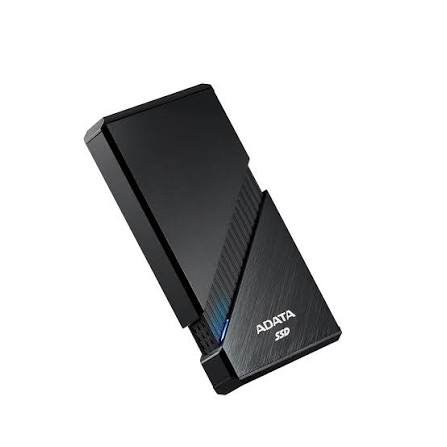
The ADATA SE920 stands out from every other drive in this lineup through one genuinely clever engineering decision: a spring-loaded casing that slides open to expose air vents and activate a built-in micro-fan. USB4 drives generate significant heat, and most manufacturers solve this with passive cooling or just hope for the best. ADATA built active cooling into the drive itself, and while it introduces some mechanical complexity, it’s a thoughtful solution to a real problem.
The SE920 runs USB4 40 Gbps with peak speeds of 3,800 MB/s read and 3,700 MB/s write, comes with a 5-year warranty, and is available in 1 TB, 2 TB, and 4 TB configurations. It’s also compatible with PS5 and Xbox Series X/S, making it a capable gaming drive.
Key Specifications
| Spec | Details |
|---|---|
| Interface | USB4 40 Gbps (USB-C) |
| Max Sequential Read | 3,800 MB/s |
| Max Sequential Write | 3,700 MB/s |
| Controller | ASMedia ASM2464 / Silicon Motion SM2264 |
| NAND | 3D NAND TLC |
| Capacities | 1 TB, 2 TB, 4 TB |
| Weight | ~198 g (heavier due to active cooling) |
| IP Rating | None |
| Cooling | Active micro-fan (manual activation) |
| Warranty | 5 years limited |
| Compatibility | macOS, Windows, Linux, PS5, Xbox Series X/S, Android |
| Included Cable | USB-C 40 Gbps braided |
| Price | $179.99 (1 TB) / $269.99 (2 TB) / $499.99 (4 TB) |
Design and Build Quality
The SE920 is built with an aluminum shell that gives it a premium look and feel. The spring-loaded sliding mechanism is the defining design element push down on the top edge and the casing pops apart, revealing the active cooling fan inside. In normal use, the fan is nearly silent, making the cooling activation a non-intrusive feature.
The mechanism works, but it does introduce some play in the case. Multiple reviewers noted that the sliding tolerances feel slightly imprecise functional but not as tight as the fit on a LaCie or SanDisk drive. It’s a minor caveat on an otherwise solid design. The drive is significantly heavier than the Corsair EX400U, which makes sense given the additional mechanical components.
Performance and Speed
The SE920 delivers real USB4 performance numbers that are competitive with the Corsair EX400U and LaCie SSD4. PCWorld tested it and found it the fastest 40 Gbps external SSD they’d tested at the time, edging out competitors in sequential benchmarks. FPS Review confirmed read speeds of 3,800 MB/s on a USB4 40 Gbps system.
One important caveat that multiple reviewers flagged: write caching. On Windows, ADATA recommends switching the drive to “Better Performance” mode in Device Manager, which enables write caching. Without this, write speeds underperform rated specifications. On Mac and Linux, achieving peak write speeds requires terminal configuration more technical knowledge than most users should need to operate a consumer drive.
Real-World File Transfer Performance
When configured correctly and connected via USB4, the SE920 transfers 4K and 8K footage at rates that compare favorably with the LaCie SSD4 and Corsair EX400U. PC Gamer testing showed it hitting rated 3,800 MB/s sequential speeds for approximately 45 seconds of sustained writing before thermal management stepped in with active cooling enabled, peak-speed writing resumed after a brief recovery period, which is a more graceful behavior than most passively cooled drives exhibit.
Thermal Performance
This is where the SE920 differentiates itself. ADATA claims the active cooling makes it approximately 10% cooler than competing fanless drives at equivalent loads. In testing, the micro-fan was barely audible, and the active cooling did meaningfully extend the window of peak-speed operation during heavy sustained writes. For long transfer sessions bulk video archive copies, large game library migrations the built-in fan gives the SE920 a tangible advantage.
Durability and Rugged Features
There’s no IP rating and no drop protection specification for the SE920. The aluminum shell provides decent day-to-day protection, but this isn’t a field drive. For studio work and travel in a padded bag, it’s adequate. For outdoor professional use, consider the LaCie options instead.
Compatibility
The SE920 works across Windows, macOS, Linux, PS5, and Xbox Series X/S. For console gamers, the explicit PS5 and Xbox compatibility is a notable feature the drive’s performance makes it well-suited for storing and launching console games. It’s one of the few USB4 drives with confirmed compatibility logos for both major current-generation consoles.
Security Features
Hardware encryption support varies by model configuration check current product specifications for your specific capacity. Software-based encryption via VeraCrypt or BitLocker is an alternative on Windows.
Software and Utilities
ADATA provides free backup software downloadable from their website. It’s functional but not as feature-rich as LaCie’s Toolkit or Corsair’s SSD Toolbox. The more important software consideration is the write caching configuration mentioned above, which requires manual intervention for best performance on Mac and Linux.
Pros
- Active cooling extends peak-speed transfer windows significantly
- 5-year warranty longer than most competitors in this category
- Verified PS5 and Xbox Series X/S compatibility
- Competitive pricing for USB4 performance
- Solid sustained write performance with active cooling enabled
Cons
- Write caching requires manual configuration for optimal results on Mac/Linux
- Heavier than comparable drives without active cooling
- No IP rating or rugged protection
- Fan mechanism feels slightly imprecise
- Some early unit tests showed performance variance without write cache adjustment
Best For
Console gamers who want fast USB4 storage for PS5 or Xbox Series X/S. Content creators doing long, sustained write sessions where active cooling prevents throttling. Users who frequently move large archives and want consistent performance over time.
Who Should Avoid It
Mac and Linux users who don’t want to fiddle with terminal configuration to unlock proper write performance. Anyone needing rugged or waterproof protection. Users looking for a simpler plug-and-play experience.
Final Verdict
The ADATA SE920 is a genuinely interesting drive that solves a real problem USB4 heat management in an inventive way. The active cooling system works, the 5-year warranty is excellent, and console compatibility is a differentiator. The write caching configuration requirement on non-Windows systems is a genuine friction point, and the lack of rugged protection limits its versatility. For the right user a console gamer or a Windows-based content creator doing heavy sustained transfers it earns a recommendation. 8/10
5. SanDisk Professional PRO-G40 SSD
Overview
The SanDisk Professional PRO-G40 represents a slightly different era of portable SSD design Thunderbolt 3 rather than USB4 but it remains relevant in 2026 for a specific reason: its unique dual-mode capability. Plug it into a Thunderbolt 3/4 port and you get up to 3,000 MB/s reads. Connect it to a regular USB 3.2 Gen 2 port and it falls back to a solid 1,000 MB/s. No adapter required, no performance cliff just one drive that works everywhere.
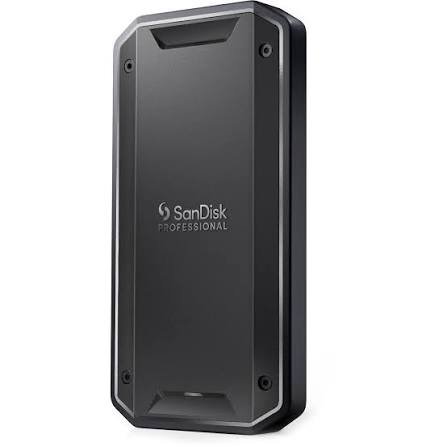
Pair that flexibility with an IP68 rating, a 3-meter drop spec, 4,000-pound crush resistance, and a clean aluminum build, and you have a drive that’s earned a loyal following among photographers, filmmakers, and field professionals.
Key Specifications
| Spec | Details |
|---|---|
| Interface | Thunderbolt 3 (40 Gbps) / USB 3.2 Gen 2 (10 Gbps) |
| Max Sequential Read | 3,000 MB/s (TB3) / 1,050 MB/s (USB) |
| Max Sequential Write | 2,500 MB/s (TB3) / 1,000 MB/s (USB) |
| Internal Drive | WD Black SN750E NVMe (M.2 2280) |
| Capacities | 1 TB, 2 TB, 4 TB |
| Dimensions | 110 × 58 × 12 mm |
| Weight | ~120 g |
| IP Rating | IP68 (1.5 m / 30 min) |
| Drop Protection | 3 m |
| Crush Resistance | 4,000 lb (approx. 1.8 tons) |
| Warranty | 5 years |
| Compatibility | macOS, Windows (with reformatting), Linux |
| Included Cable | USB-C to USB-C (~20 cm) |
| Price | $159.99 (1 TB) / $199.99 (2 TB) / $400 (4 TB, current market pricing) |
Design and Build Quality
The PRO-G40 breaks the mold that SanDisk’s consumer Extreme drives established. The aluminum core is machined and substantial, with rubberized TPU edges that provide both grip and shock absorption. The USB-C port is reinforced with metal, addressing one of the common failure points on thinner portable drives.
Holding the PRO-G40, the quality difference compared to most consumer portable SSDs is immediately perceptible. StorageReview described it as a “quality enclosure you can feel how rugged the device is while handling.” Tom’s Hardware noted the aluminum core serves double duty as a passive heatsink, helping keep the NVMe drive inside at operating temperature during transfers.
Performance and Speed
The PRO-G40’s performance story depends entirely on which bus you’re using. Over Thunderbolt 3, the internal WD Black SN750E NVMe drive stretches its legs and delivers sequential reads up to 3,000 MB/s and writes up to 2,500 MB/s excellent numbers that easily handle 4K RAW footage transfers and real-time editing.
Over USB 3.2 Gen 2, the drive maxes out around 1,000–1,050 MB/s. That’s still faster than most casual users need for day-to-day transfers, but it doesn’t compete with USB4 drives when you can access the faster interface.
Photography Life’s real-world testing on a MacBook Pro M1 Max showed 2,800 MB/s reads and 2,550 MB/s writes both competitive figures that exceeded specs on the write side in some configurations. AmorphousDiskMark testing reached 3,132 MB/s reads and 2,582 MB/s writes.
Real-World File Transfer Performance
The PRO-G40 excels at workloads photographers and videographers care about most: copying large batches of RAW files from a card reader to the drive, or transferring finished video projects between a laptop and an editing station. StorageReview found the drive fully saturated both Thunderbolt and USB 3.2 bandwidth no underperformance, no reliability surprises.
PCWorld noted the Thunderbolt implementation is genuinely faster than the USB bus with a real-world 50 GB file taking around 30 seconds over Thunderbolt 3 a tangible, practical speed.
Thermal Performance
The aluminum enclosure’s passive cooling works well for the SN750E’s operating characteristics. Unlike USB4 drives that run at the thermal limits of their controllers, the PRO-G40 tends to run cooler during typical transfers. This reflects the Thunderbolt 3 era’s slightly lower heat generation compared to newer USB4 implementations, and it contributes to the drive’s consistent performance over extended sessions.
Durability and Rugged Features
IP68 is the best standard water resistance rating available full protection from dust ingress and the ability to withstand immersion at 1.5 meters for 30 minutes. Combined with a 3-meter drop spec and 4,000-pound (approximately 1.8-ton) crush resistance, the PRO-G40 is arguably the most durably specified drive in this roundup after the LaCie Pro5.
The rubber TPU edges and reinforced USB-C port handle real-world abuse better than most alternatives. This is a drive built to survive field conditions, not just spec sheet claims.
Compatibility
Ships pre-formatted for macOS, which means Windows users need to reformat a minor inconvenience that’s worth being aware of. Works cleanly with macOS, Windows (post-reformat), and Linux, and is compatible with a Thunderbolt 3 or newer host for full performance. StorageReview confirmed compatibility via USB-C cable and Thunderbolt cable on both Windows and macOS.
One limitation: no console gaming compatibility. The PRO-G40 is not listed as compatible with PS5 or Xbox Series X/S in SanDisk’s documentation.
Security Features
The internal WD Black SN750E NVMe does not support hardware encryption. BitLocker (Windows) or FileVault (macOS) software encryption is available, but it doesn’t provide the same protection as hardware AES-256. For professionals with strict data security requirements, this is a real consideration.
Software and Utilities
SanDisk’s software story is the weakest part of the PRO-G40 experience. The SanDisk Dashboard reportedly doesn’t recognize the drive, and there’s no bundled utility for backup, firmware updates, or drive health monitoring. Tom’s Hardware noted this as a significant gap for a premium-priced professional product. Western Digital does provide some resources through its support pages.
Pros
- Dual-mode Thunderbolt 3 + USB 3.2 Gen 2 compatibility in one drive
- IP68 rating for full dust and submersion protection
- Excellent build quality with aluminum core and metal-reinforced port
- 5-year warranty
- Consistent real-world performance close to spec
- Aluminum enclosure provides effective passive cooling
Cons
- No hardware encryption support
- No dedicated software or firmware update utility
- Slower than USB4 drives (Thunderbolt 3 top speed ~3,000 MB/s vs 4,000+ MB/s for USB4)
- Ships pre-formatted for Mac Windows users need to reformat
- No PS5/Xbox console compatibility
- Premium price compared to newer USB4 alternatives
Best For
Professional photographers, videographers, and field workers who need both Thunderbolt speed and genuine IP68 waterproofing. Works well for mixed Mac/PC environments where the USB 3.2 fallback ensures compatibility with any USB-C port. The 5-year warranty and exceptional build quality make it a reliable long-term investment.
Who Should Avoid It
Users without Thunderbolt 3/4 ports won’t get the headline speeds. Console gamers should look at the ADATA SE920. Anyone needing hardware encryption should look elsewhere. Users who want the absolute fastest speeds available should move to USB4 or Thunderbolt 5 options.
Final Verdict
The SanDisk Professional PRO-G40 is a mature, proven design that trades bleeding-edge interface speed for exceptional versatility and build quality. In a world where USB4 drives now offer comparable or faster speeds at lower prices, the PRO-G40’s value proposition rests on its IP68 protection, dual Thunderbolt/USB compatibility, outstanding construction quality, and five-year warranty. For professionals who need a drive that can be both their primary studio SSD and their field backup unit, it delivers. 8.5/10
Portable SSD Comparison Table
| LaCie Rugged SSD4 | Corsair EX400U | LaCie Rugged Pro5 | ADATA SE920 | SanDisk PRO-G40 | |
|---|---|---|---|---|---|
| Max Read | 4,000 MB/s | 4,000 MB/s | 6,700 MB/s | 3,800 MB/s | 3,000 MB/s |
| Max Write | 3,800 MB/s | 3,600 MB/s | 5,300 MB/s | 3,700 MB/s | 2,500 MB/s |
| Interface | USB4 40 Gbps | USB4 40 Gbps | Thunderbolt 5 | USB4 40 Gbps | TB3 + USB 3.2 |
| IP Rating | IP54 | None | IP69 | None | IP68 |
| Active Cooling | No | No | No | Yes (micro-fan) | No |
| Capacities | 1/2/4 TB | 1/2/4 TB | 2/4 TB | 1/2/4 TB | 1/2/4 TB |
| Mac Compatibility | Excellent | Excellent | TB5 Macs best | Good | Excellent |
| Windows Compatibility | Excellent | Excellent | Complex (TB5 required for full speed) | Good | Good |
| Console Compatible | No | No | No | Yes (PS5/Xbox) | No |
| Warranty | 3 yr + Recovery | 3 years | 5 yr + Recovery | 5 years | 5 years |
| Price (2 TB) | ~$215 | ~$179 | ~$400 | ~$270 | ~$200 |
| Value for Money | Good | Excellent | Average | Good | Average |
| Overall Rating | 9/10 | 8.5/10 | 9.5/10 | 8/10 | 8.5/10 |
Which Portable SSD Should You Buy?
Best Overall: LaCie Rugged SSD4
For most professionals and serious enthusiasts, the Rugged SSD4 hits the best all-around balance. You get genuine USB4 performance (4,000 MB/s reads), meaningful rugged protection (IP54, 3-meter drop), broad compatibility across every platform, and LaCie’s 3-year warranty with Rescue Data Recovery. It’s not the cheapest option, but it delivers more confidence for field use than the Corsair EX400U, and it doesn’t require a Thunderbolt 5 system like the Pro5 does.
Best Professional SSD: LaCie Rugged SSD Pro5
If you’re a professional on an M4 Pro or M4 Max Mac and you need the fastest scratch disk available for 6K/8K workflows, nothing in this roundup or anywhere else at time of writing beats the Pro5. The IP69 protection, 5-year warranty, and 6,700 MB/s peak read speeds make it the definitive choice for high-end creative professionals willing to pay the premium.
Best for Video Editing: LaCie Rugged SSD Pro5 (Mac) / LaCie Rugged SSD4 (Windows)
On a Thunderbolt 5 Mac, the Pro5’s 50 GB SLC cache and near-7,000 MB/s reads enable real-time editing of practically any current video format. For Windows or mixed-platform users, the Rugged SSD4’s USB4 speeds comfortably handle ProRes 4K and most 8K workflows at a lower price.
Best for Photography: SanDisk Professional PRO-G40
Photographers who work in varied environments need a drive they can trust. The PRO-G40’s IP68 submersion protection, 4,000-pound crush resistance, and consistent Thunderbolt 3 performance make it the natural choice for field photographers. The 5-year warranty provides long-term peace of mind for a drive that lives in a camera bag.
Best for Gaming: ADATA SE920
Console gamers get explicit PS5 and Xbox Series X/S compatibility, fast USB4 transfer speeds for game installations, and the active cooling advantage for extended gaming sessions. On PC, the SE920’s USB4 speeds make game loading from an external drive faster than any USB 3.2 option. It’s the most versatile choice for gamers across platforms.
Best for Mac Users: LaCie Rugged SSD Pro5 (M4 Pro/Max Macs) / LaCie Rugged SSD4 (all Macs)
Mac users have two clear LaCie options depending on their hardware. The Pro5 is exceptional for the latest MacBook Pro and Mac mini with TB5 ports. For everyone else including M3, M2, and Intel Mac users the Rugged SSD4 provides excellent USB4 performance that’s fully Thunderbolt-compatible without the Pro5’s setup complexity.
Best for Windows Users: Corsair EX400U
On Windows with a USB4 or Thunderbolt 4 system, the Corsair EX400U delivers performance competitive with the LaCie SSD4 at a lower price. The MagSafe ring works with Android phones as well as iPhones, and Corsair’s Windows compatibility is straightforward. For a Windows-first user, it’s hard to justify paying more for the LaCie.
Best USB4 SSD: Corsair EX400U
For pure USB4 value, the EX400U wins on price and compact form factor. It matches the LaCie SSD4 closely on raw performance while costing significantly less. If rugged protection isn’t a priority, it’s the best USB4 purchase.
Best Rugged SSD: LaCie Rugged SSD Pro5 (IP69) / SanDisk PRO-G40 (IP68, all platforms)
For maximum protection, the Pro5’s IP69 rating beats everything in this roundup. If you need rugged protection on a mixed Mac/PC or USB-only workflow, the PRO-G40’s IP68 rating and dual-mode compatibility make it the most versatile rugged option.
Best Value for Money: Corsair EX400U
It’s straightforward: the EX400U delivers close to the same USB4 performance as drives costing 50–100% more. If your workflow doesn’t require rugged protection or Thunderbolt 5 speeds, it’s the rational choice.
Portable SSD Care and Maintenance Tips
A portable SSD is a precision device. Treating it right extends its lifespan and protects your data.
Safe Storage
Store drives in a padded case or sleeve when not in use. Even drives with rugged enclosures benefit from protection against sustained pressure or concentrated impacts. Keep the storage environment dry and at room temperature.
Avoiding Data Loss
Always maintain at least two copies of important data the portable SSD should be your working drive, not your only archive. The 3-2-1 backup rule applies: three copies, on two different media types, with one offsite or in the cloud.
Proper Ejection
Never unplug a portable SSD while data is transferring. Use the “safely remove” or “eject” function on your operating system before disconnecting. This ensures all cached data is written to the NAND and the file system is cleanly closed. The ADATA SE920 particularly benefits from proper ejection given its write caching feature.
Firmware Updates
Check manufacturer websites periodically for firmware updates. Updates can resolve bugs, improve compatibility, and occasionally improve performance. LaCie Toolkit, Corsair SSD Toolbox, and ADATA’s utilities all support firmware update notifications.
Temperature Management
Avoid leaving portable SSDs in hot cars or direct sunlight for extended periods. NAND flash endures heat, but sustained high temperatures accelerate cell wear. If you’re doing heavy transfers in a warm environment, the ADATA SE920’s active cooling fan is worth engaging.
Cable Care
The included USB4 and Thunderbolt cables are rated for 40 Gbps. Using a lower-spec cable can silently throttle your drive’s performance. Keep your high-speed cables separate from the tangle of generic USB-C cables in a drawer. Coil them loosely rather than tightly to avoid wire stress.
Backup Best Practices
Set up automatic backup schedules using the included software utilities. LaCie Toolkit’s sync feature handles incremental backups efficiently. For Macs, configuring Time Machine to use the portable SSD as a backup destination provides seamless, continuous protection.
Long-Term Storage Tips
If you’re storing a portable SSD with data on it for months without use, charge the device to around 50% capacity (if it has any battery), store at room temperature, and check it every six months. NAND flash can lose charge retention over time, though modern TLC NAND retains data reliably for multiple years under normal storage conditions.
Frequently Asked Questions
Are portable SSDs worth buying? Absolutely. For anyone who regularly moves more than a few gigabytes of data photographers, videographers, gamers, professionals, or serious students the speed difference over a traditional external hard drive is transformative. A modern USB4 SSD transfers a 100 GB file in roughly 30 seconds. A comparable HDD takes 3–5 minutes.
How long do portable SSDs last? Most consumer-grade TLC NAND SSDs are rated for 600–1,200 TBW (terabytes written) per terabyte of capacity. At realistic usage patterns, this translates to 7–10 years for typical users. The drives reviewed here carry 3–5-year warranties, which reflects manufacturer confidence in their longevity.
Which SSD is best for video editing? The LaCie Rugged SSD Pro5 is the best portable SSD for video editing on Thunderbolt 5 Macs. For everyone else, the LaCie Rugged SSD4 or Corsair EX400U provide USB4 speeds sufficient for 4K and most 8K workflows.
What is the difference between USB4 and Thunderbolt? USB4 is a protocol standard built on the Thunderbolt 3 specification. Both USB4 and Thunderbolt 4 operate at 40 Gbps maximum bandwidth and are electrically compatible. Thunderbolt 5 doubles the available bandwidth to 80 Gbps in one direction (120 Gbps with bandwidth boost), enabling the speeds seen in the LaCie Pro5. Thunderbolt branding generally indicates Intel-certified performance guarantees; USB4 is the more accessible standard that works across more devices.
Can I use a portable SSD for gaming? Yes. The ADATA SE920 is the best choice for console gaming, with explicit PS5 and Xbox Series X/S certification. On PC, any USB4 SSD provides dramatically faster game loading than an external HDD. Note that PS5 requires direct attachment to the console’s USB-C port for optimal performance.
Are portable SSDs waterproof? It depends on the drive. The SanDisk PRO-G40 (IP68) and LaCie Rugged SSD Pro5 (IP69) can survive submersion in water. The LaCie Rugged SSD4 is splash-resistant (IP54) but not submersion-rated. The Corsair EX400U and ADATA SE920 have no water resistance rating.
Which capacity should I buy? 1 TB is the minimum practical size for most users today. If you work with video, 2 TB is a better starting point. Photographers and videographers working on large projects should consider 4 TB. Prices for 2 TB drives represent the best value per gigabyte in this category in 2026.
Can I boot an operating system from a portable SSD? Yes, in most cases. macOS supports booting from external Thunderbolt and USB4 SSDs with some configuration. Windows 11 supports USB boot drives with appropriate setup. Performance for a boot drive benefits significantly from USB4 or Thunderbolt speeds over USB 3.2.
Do SSDs slow down when nearly full? Yes, somewhat. SSDs rely on free space for garbage collection and wear leveling. Performance can drop noticeably when a drive is more than 85–90% full. It’s good practice to keep at least 10–15% of the drive’s capacity free.
How should I maintain a portable SSD? Eject properly before unplugging. Check for firmware updates periodically. Store in a padded case away from extreme temperatures. Avoid leaving at high fill capacity for extended periods. Maintain backup copies of important data no storage device is fail-proof.
Does USB4 work with older USB-C ports? USB4 drives are backward compatible with USB 3.2, USB 3.1, and USB 3.0 ports. However, your speeds will be limited to the older port’s maximum typically 1,000 MB/s over USB 3.2 Gen 2. You’ll only see USB4 speeds (3,500–4,000+ MB/s) when connected to a USB4 or Thunderbolt 4/5 port.
What is the fastest portable SSD in 2026? The LaCie Rugged SSD Pro5 is the fastest portable SSD currently available, with Thunderbolt 5 enabling sequential reads near 7,000 MB/s on compatible M4 Mac systems. Among USB4 drives, the LaCie Rugged SSD4 and Corsair EX400U both reach approximately 4,000 MB/s reads.
Can portable SSDs be used with smartphones? Yes, particularly USB-C smartphones. The Corsair EX400U’s MagSafe ring enables magnetic attachment directly to iPhone 16 series and MagSafe-compatible Android devices. iPhones with USB-C (iPhone 15 and later) can record ProRes video directly to a connected USB4 SSD. Android devices with USB OTG support also work with these drives.
Is hardware encryption important for a portable SSD? If you store sensitive client data, financial information, or confidential materials on the drive, hardware AES-256 encryption is strongly recommended. It protects your data in the event the drive is lost or stolen, without the performance penalty of software encryption. All drives in this roundup except the SanDisk PRO-G40 support hardware encryption.
How do I know if my computer has a USB4 port? Look for the USB4 logo (a “4” next to the USB symbol), or a Thunderbolt logo (a lightning bolt symbol) next to a USB-C port on your machine. Most modern MacBooks and Mac minis support Thunderbolt 4 or 5. On Windows, USB4 ports are common on newer AMD Ryzen 7000+ and Intel 12th Gen+ systems. Check your laptop’s spec sheet or motherboard manual to confirm.
Final Verdict
After reviewing all five drives in this roundup, here’s where each one lands:
The LaCie Rugged SSD4 is the drive we’d recommend to most people reading this guide. It delivers full USB4 performance, works across every platform without fuss, survives field conditions better than the competition at this price, and comes with the reassurance of LaCie’s Rescue Data Recovery service. For photographers, filmmakers, and content creators who travel, it’s the complete package.
The Corsair EX400U is the smarter purchase if rugged protection isn’t a priority and you want to maximize performance per dollar. Its MagSafe integration is genuinely useful for smartphone creators, and the performance numbers are comparable to the LaCie at a notably lower price.
The LaCie Rugged SSD Pro5 is in a category of its own. Nothing else touches its speeds on Thunderbolt 5 hardware. If you have an M4 Pro or M4 Max Mac and you work professionally with large files, it’s the clear choice and the IP69 protection and 5-year warranty justify the premium. For everyone else, it’s a drive to add to your wishlist for when Thunderbolt 5 becomes more mainstream.
The ADATA SE920 earns its place for two specific reasons: console gaming compatibility and active cooling. If you’re a gamer switching between PS5, Xbox, and PC, or a content creator who does long sustained write sessions, the built-in fan is a meaningful advantage. The write cache configuration requirement on non-Windows platforms is the asterisk you need to know about before buying.
The SanDisk Professional PRO-G40 remains one of the most field-proven portable SSDs available, with IP68 waterproofing and build quality that sets it apart. It’s slower than USB4 alternatives, but the dual Thunderbolt/USB compatibility and exceptional durability make it a compelling choice for professionals who need a drive that works everywhere and survives everything.
There’s no universally wrong choice here it depends on your hardware, your workflows, and how much risk you’re willing to subject your data to in the field. Use this guide to match the right drive to your real-world needs.