

Wireless mice have come a long way. What once meant lag, disconnects, and dead batteries at the worst possible moment now means sub-millisecond latency, 150-hour battery life, and polling rates that outpace most wired competitors. The gap between wireless and wired has essentially closed and for many users, wireless is now the clearly superior choice.

But here’s the problem: the market is flooded. There are dozens of options at every price point, with spec sheets that look impressive on paper but translate very differently into real-world use. Picking the wrong mouse even an expensive one can mean discomfort during long work sessions, missed shots in competitive games, or a device that just doesn’t fit the way you actually hold a mouse.
That’s exactly why this guide exists.
The best wireless mouse for most people in 2026 is the Logitech MX Master 4. It delivers the best combination of precision tracking, intelligent software, ergonomic design, and versatile connectivity for professionals and everyday users alike. Gamers, on the other hand, will find better options tailored to their needs among our other picks.
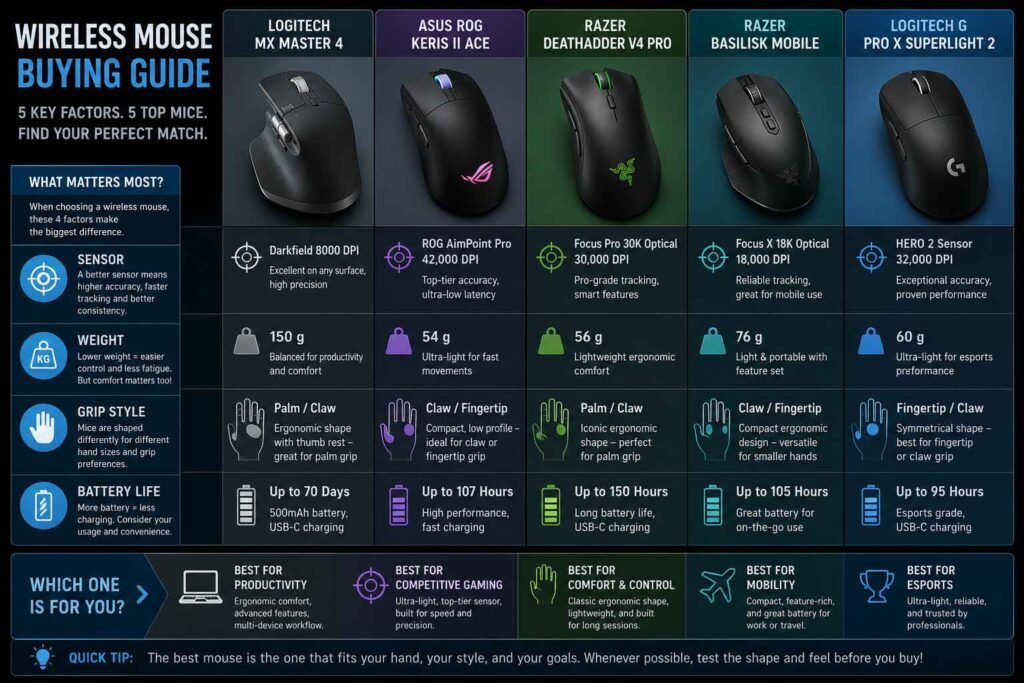
We tested and researched five of the strongest wireless mice available right now across different use cases: the Logitech MX Master 4 for productivity, the Asus ROG Keris II Ace and Razer DeathAdder V4 Pro for competitive gaming, the Razer Basilisk Mobile for on-the-go use, and the Logitech G PRO X SUPERLIGHT 2 for esports-grade performance in an ultra-light form.
Whether you’re a creative professional grinding through long design sessions, a competitive FPS player chasing every millisecond of advantage, or someone who just wants a reliable daily driver that won’t quit mid-presentation there’s a wireless mouse on this list for you.
Let’s break them all down.
Quick Comparison: Best Wireless Mice at a Glance
| Mouse | Best For | Sensor | Weight | Connectivity | Battery Life | Programmable Buttons | Price | Rating |
|---|---|---|---|---|---|---|---|---|
| Logitech MX Master 4 | Productivity & Creators | Darkfield 8K | ~141g | 2.4GHz + BT | 70 days | 8 | Premium ($120) | ⭐ 9.4/10 |
| Asus ROG Keris II Ace | Competitive FPS | AimPoint Pro 42K | 54g | 2.4GHz + BT | 107 hrs | 6 | Premium ($159) | ⭐ 9.2/10 |
| Razer DeathAdder V4 Pro | Ergonomic Gaming | Focus Pro 45K Gen-2 | 56g | 2.4GHz | 150 hrs | 8 | Premium ($170) | ⭐ 9.1/10 |
| Razer Basilisk Mobile | Travel & Portable Use | Focus X 18K | ~77g | 2.4GHz + BT | 200+ hrs | 10 | Mid-Range ($90) | ⭐ 8.4/10 |
| Logitech G PRO X SUPERLIGHT 2 | Esports & FPS | HERO 2 44K | 60g | 2.4GHz | 95 hrs | 5 | Premium ($160) | ⭐ 9.3/10 |
What to Look for Before Buying a Wireless Mouse
Before we get into the reviews, it’s worth understanding what actually separates a good wireless mouse from a great one. These factors will help you filter by your own needs because the “best” mouse is always the best mouse for you.
Sensor Accuracy and DPI Range
The sensor is the heart of any mouse. Modern optical sensors track movement by photographing the surface below at extremely high rates, calculating distance and direction with remarkable precision.
DPI (dots per inch) also called CPI (counts per inch) determines how far the cursor moves relative to physical mouse movement. Higher DPI means more cursor movement per inch. Most users find 800–1600 DPI comfortable for everyday use, while FPS gamers often prefer 400–800 DPI for precise aim. You don’t need 40,000 DPI for real-world use; that figure is mostly a spec-sheet number. What matters more is accuracy at your preferred setting which means zero jitter, no angle snapping, and consistent tracking across different surfaces.
Polling Rate
Polling rate describes how often the mouse reports its position to the computer, measured in Hz. A 1000 Hz polling rate means 1,000 position updates per second. Higher-end gaming mice now support 4,000 Hz and even 8,000 Hz, reducing the gap between your physical movement and what appears on screen. For gaming especially competitive FPS a higher polling rate genuinely reduces input latency. For office work, 125–250 Hz is more than sufficient.
Tracking Performance and Lift-Off Distance
Beyond raw DPI, actual tracking consistency is what matters. A good sensor tracks faithfully without introducing smoothing, acceleration, or jitter at your chosen DPI. Lift-off distance (LOD) how high you can lift the mouse before it stops tracking matters for players who regularly reposition. A shorter LOD is generally preferred for competitive gaming.
Weight
Weight affects fatigue and control in different ways. Lighter mice (sub-60g) excel at fast, flicking motions common in FPS games and reduce wrist fatigue over long sessions. Heavier mice can feel more “planted” and intentional, which some users prefer for productivity or slower-paced gaming. The right weight is highly personal there’s no universal winner.
Shape, Ergonomics & Grip Style
Grip style should drive your shape choice:
- Palm grip Your entire hand rests on the mouse. You need a mouse with sufficient length and a high arch. Great for comfort in long sessions.
- Claw grip Your palm touches the rear, but your fingers are arched over the buttons. Works well with medium-height mice.
- Fingertip grip Only fingertips touch the mouse. You need a smaller, lighter mouse. Most common among FPS competitive players.
Right-handed ergonomic mice (which dominate this category) favor palm and claw grippers with their right hand. Symmetrical mice accommodate left-handers or fingertip grip players.
Button Quality and Scroll Wheel
Switch technology matters more than people realize. Optical switches offer near-instant actuation and never double-click, making them ideal for gaming. Hybrid optical-mechanical switches combine the reliability of optics with the tactile feel of mechanical clicks. Scroll wheels range from a simple notched wheel to sophisticated magnetic or free-spinning mechanisms like Logitech’s MagSpeed, which is particularly useful for productivity.
Battery Life: Rechargeable vs. Replaceable
Most premium wireless mice now come with built-in rechargeable batteries via USB-C. Battery life ranges from 70 to 200+ hours depending on the mouse and polling rate settings. Some users prefer AA battery designs for easy swaps in the field, though these are becoming rarer among premium options. Fast charging is a meaningful feature many mice recover playable battery in under 15 minutes.
2.4GHz Dongle vs. Bluetooth
A dedicated 2.4GHz USB dongle provides significantly lower and more consistent latency than Bluetooth. This makes it the preferred choice for gaming. Bluetooth is better for portability, multi-device pairing, and situations where you don’t want to use a USB port. Several premium mice offer both, letting you switch based on context.
Software Features and Onboard Memory
Good peripheral software lets you remap buttons, create profiles, tune DPI, adjust lift-off distance, and save settings. Onboard memory means your settings travel with the mouse no software needed on a new PC.
RGB Lighting
RGB has minimal impact on performance but adds visual flair. It consumes battery, so if battery life is a priority, disabling lighting or choosing a mouse without it is a smart move.
Durability and Surface Compatibility
Look for mice with at least 50–100 million click ratings on their primary switches. PTFE (Teflon) feet provide smooth, consistent glide on virtually all mouse pads. Some sensors include glass-tracking modes, which is useful if you use a glass or hard, reflective surface.
Our Top 5 Wireless Mouse Reviews for 2026
1. Logitech MX Master 4 Best Wireless Mouse for Productivity
Overview
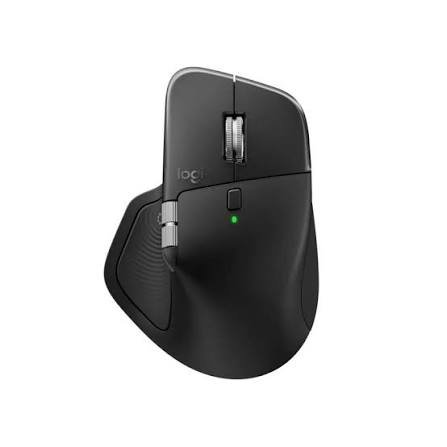
The MX Master series has dominated the productivity mouse category for years, and the MX Master 4 released in October 2025 at $120 represents the most significant leap forward since the original. It introduces two genuinely new features to the lineup: haptic feedback via a vibration motor in the thumb rest, and the Actions Ring a software-driven radial menu that pops up from your cursor on click. The result is a mouse that doesn’t just point and click, but actively integrates with your workflow in ways that reduce repetitive movement and keep your hands closer to the center of the screen.
Key Specifications
| Spec | Detail |
|---|---|
| Sensor | Darkfield High Precision (200–8,000 DPI) |
| DPI Range | 200–8,000 (50 DPI increments) |
| Weight | ~141g |
| Connectivity | Logi Bolt 2.4GHz + Bluetooth (up to 3 devices) |
| Battery Life | Up to 70 days on a single charge |
| Programmable Buttons | 8 |
| Scroll Wheel | MagSpeed electromagnetic with horizontal thumb wheel |
| Software | Logi Options+ |
| Price | ~$120 |
Design & Build Quality
The MX Master 4 carries forward the sculpted, right-handed ergonomic design the series is famous for, with some visible refinements. The surface features a slightly textured material that resists stains and wear better than the glossy sections on the MX Master 3S. The main buttons now have a subtle transparent finish. Build quality is excellent nothing creaks, shifts, or feels plasticky. It’s a mouse that feels premium before you even plug in the dongle.
One thing to be aware of: at around 141 grams, this is a substantial mouse. That weight contributes to a planted, controlled feel that productivity users tend to love, but it absolutely disqualifies this mouse from competitive gaming scenarios.
Ergonomics & Comfort
This is where the MX Master 4 shines. The sculpted shape seats your palm naturally, with a thumb rest that curves gently under your thumb and keeps your wrist in a neutral, slightly elevated position. Extended work sessions hours at a time remain comfortable in a way that few mice can match. The thumb rest also houses the haptic feedback motor, which pulses when you trigger shortcuts, scroll past snapping points, or receive designated notifications.
Haptics add a surprising dimension of tactile awareness to daily computer use. You feel when a window snaps to a grid, when a slider hits a key value, or when a notification arrives. It’s subtle enough to not be distracting but present enough to be genuinely informative.
Sensor & Tracking Performance
The Darkfield sensor tracks on virtually any surface including glass and glossy finishes which is a genuine differentiator for users who work on unusual desk surfaces. The 8,000 DPI ceiling is more than adequate for any productivity task, and accuracy at lower DPI settings (where most office users operate) is excellent. There’s no jitter, no angle snapping, and movement feels smooth and predictable.
The MX Master 4 is not designed for gaming. Its polling rate sits at 250 Hz, and the dongle latency, while perfectly fine for productivity, isn’t competitive with gaming-focused 2.4GHz implementations. Don’t expect it to hang with gaming mice in fast-twitch scenarios.
Gaming Performance
Not applicable. The MX Master 4 was not engineered for gaming, and its polling rate and tracking behavior reflect that. If you game and work from the same desk, you’ll want a separate gaming mouse.
Productivity Performance
Exceptional. The MX Master 4 is the best productivity mouse money can buy in 2026. The MagSpeed scroll wheel alone capable of spinning through thousands of lines per second in free-spin mode, or locking into tactile notches for precise scrolling sets a standard that competitors haven’t matched. Add the horizontal thumb wheel for lateral navigation in spreadsheets and timelines, the Actions Ring for custom shortcut access, and Logi Options+’ extensive multi-device workflow features, and you have a mouse that genuinely makes work faster.
The Logi Options+ software enables multi-computer workflows. You can move your cursor from your MacBook to your Windows desktop just by sliding the mouse off the edge of the screen. Files, text, and images can be copied and pasted between computers. For anyone running a dual-machine setup, this alone is worth the price.
Buttons & Scroll Wheel
Eight programmable buttons include the two main buttons, the middle scroll wheel click, a gesture button below the scroll wheel, the horizontal thumb wheel, the thumb rest click, and the new Actions Ring button. Logitech’s software makes remapping any of these straightforward.
The MagSpeed scroll wheel remains the gold standard. Free-spin mode lets you flick through long documents at extraordinary speed. Mechanical mode gives you precise, notched control. It switches between modes automatically or manually depending on your preference setting.
Battery Life
Up to 70 days of use on a full charge and a 1-minute quick charge provides three full hours of use. In practice, most users will charge it once or twice a month. The USB-C charging cable is included.
Connectivity Options
Logi Bolt provides the primary wireless connection via a 2.4GHz USB dongle, with strong signal integrity even in crowded RF environments. Bluetooth allows connection to up to three additional devices, which you can switch between with a button press on the underside. This makes the MX Master 4 ideal for anyone juggling a work laptop, a personal machine, and a desktop.
Software & Customization
Logi Options+ is one of the most fully-featured mouse configuration platforms available. Profile switching, per-app button assignments, haptics customization, Actions Ring configuration, and plugin support for third-party apps make this an extremely deep ecosystem. Windows 11’s native haptics integration (as of the March 2026 update) adds another layer of tactile utility without needing additional software.
Real-World Performance
After several months of daily use on a multi-monitor creative setup, the MX Master 4 becomes an extension of how you work rather than just a pointing device. The Actions Ring takes a few days to set up meaningfully, but once you’ve populated it with your most-used shortcuts, you use it constantly. The haptics normalize quickly not in the sense that you stop noticing them, but in the sense that you start relying on them.
Pros
- Industry-leading MagSpeed scroll wheel
- Exceptional ergonomics for extended sessions
- Haptic feedback genuinely improves workflow
- Tracks on glass and unusual surfaces
- Excellent multi-device switching
- Logi Options+ is feature-rich and reliable
Cons
- Heavy at ~141g not for everyone
- Polling rate (250 Hz) is inadequate for gaming
- No Bluetooth-only mode (requires Logi Bolt dongle for primary use)
- Actions Ring takes setup time to become truly useful
- Price ($120) is higher than the MX Master 3S was at launch
Best For
Creative professionals, developers, data analysts, multi-monitor power users, and anyone who spends long hours at a computer and wants their mouse to genuinely integrate with their workflow.
Who Should Avoid It
Competitive gamers, left-handed users, and anyone who needs a lightweight mouse for fast, sweeping movements.
Final Verdict
The Logitech MX Master 4 is the definitive productivity wireless mouse in 2026. The haptics and Actions Ring are genuine innovations, not marketing checkboxes, and they change how the mouse feels to use in a meaningful way. At $120, it costs a premium but for professionals who live in front of a screen, it earns that premium.
2. Asus ROG Keris II Ace Best Wireless Gaming Mouse for FPS
Overview
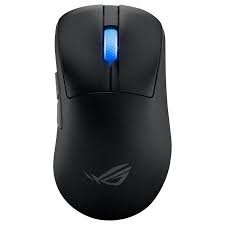
ASUS took a bold swing with the ROG Keris II Ace, and it landed. Released in late 2024 and still one of the strongest competitive mice on the market heading into 2026, the Keris II Ace packs a 42,000 DPI sensor, a wireless polling rate of up to 4,000 Hz (8,000 Hz wired), optical micro switches rated for 100 million clicks, tri-mode connectivity, and up to 107 hours of battery life all inside a 54-gram solid-shell body with no holes, no honeycombing, and no compromises on structural integrity.
This is what a premium FPS mouse looks like in 2026.
Key Specifications
| Spec | Detail |
|---|---|
| Sensor | ROG AimPoint Pro Optical (up to 42,000 DPI) |
| Max Tracking Speed | 750 IPS |
| Max Acceleration | 50G |
| Weight | 54g |
| Connectivity | 2.4GHz (ROG SpeedNova) + Bluetooth (up to 3 devices) |
| Polling Rate | Up to 4,000 Hz (wireless) / 8,000 Hz (wired) |
| Battery Life | Up to 107 hours (2.4GHz, no RGB) |
| Programmable Buttons | 6 |
| Mouse Feet | 100% PTFE |
| Switch Type | ROG Optical Micro Switches (100M click lifespan) |
| Price | ~$159 |
Design & Build Quality
The Keris II Ace uses a bio-based nylon shell to hit its 54-gram target without resorting to honeycomb cutouts. This is genuinely impressive the mouse feels solid and consistent under pressure, with none of the slight flex you sometimes feel with open-shell designs. The build quality throughout is excellent: buttons sit flush, side panels don’t rattle, and PTFE feet feel slippery in the best possible way.
It ships with a 2-meter ROG Paracord charging cable, a wireless extender with metal clip, and a replacement set of mouse feet a thoughtful accessory package for a competitive mouse.
Ergonomics & Comfort
The Keris II Ace is a right-handed ergonomic design shaped in collaboration with professional FPS players and it shows. The right side flares outward to rest your ring finger naturally. The main button edges slope downward slightly to prevent accidental pinching. The overall arch is moderate high enough for palm grip but comfortable in claw too.
At 54 grams, it’s light enough to feel effortless during fast movements while retaining enough body to feel like a real tool rather than a feather. Medium to large hands will find this shape most comfortable.
Sensor & Tracking Performance
The AimPoint Pro sensor is exceptional. With up to 42,000 DPI and less than 1% CPI deviation, tracking accuracy is among the best available. The sensor includes glass-tracking capability an increasingly common feature at this tier, but noteworthy nonetheless. There’s no angle snapping and no smoothing at competitive DPI settings (400–1600 DPI). It tracks faithfully at all normal use speeds.
The 4,000 Hz wireless polling rate (achieved via the included Polling Rate Booster dongle) pushes this mouse toward the cutting edge of wireless responsiveness. The reduction in perceived latency compared to a 1,000 Hz mouse is subtle but consistent.
Gaming Performance
Outstanding. In fast-paced FPS titles like Counter-Strike 2, Valorant, and Apex Legends, the Keris II Ace performs flawlessly. Tracking is precise, the optical switches actuate instantly without any pre-travel, and the 54-gram weight enables fast wrist flicks and arm swipes without fatigue. The lack of accidental double-clicking a chronic problem with mechanical switches in aggressive gaming scenarios is a meaningful advantage.
The 107-hour battery life means this mouse survives even the most marathon sessions without a mid-game scramble for the charging cable.
Productivity Performance
Functional, but not its strong suit. Six buttons means fewer shortcuts to assign, and the shape and weight class make it less comfortable for all-day productivity compared to the MX Master 4. The Armoury Crate software is comprehensive but can feel overly complex for simple remapping tasks.
It works fine as a secondary travel mouse for laptop use the Bluetooth multi-pairing is genuinely useful but dedicated productivity users will want something built for that purpose.
Buttons & Scroll Wheel
Six programmable buttons: two main buttons, middle click, a profile switch on the underside, and two thumb buttons. Onboard controls let you adjust DPI and polling rate without launching software useful in tournament environments. The scroll wheel is tactile and well-defined, though it lacks the sophistication of premium productivity scroll wheels.
Battery Life
Up to 107 hours in 2.4GHz mode with RGB disabled exceptional for a 54-gram gaming mouse. With RGB on, expect closer to 70–80 hours, which is still excellent. Bluetooth mode extends runtime further. Charging via the included Paracord USB-C cable takes around two hours from flat.
Connectivity Options
Tri-mode connectivity: USB wired, ROG SpeedNova 2.4GHz wireless, and Bluetooth. Bluetooth supports pairing with up to three devices laptop, mobile, and desktop simultaneously. The ROG Omni Receiver can connect both the mouse and a compatible keyboard via a single dongle.
Software & Customization
ASUS Armoury Crate (or the slimmed-down Armoury Crate Gear variant) handles profile management, DPI tuning, lighting, and button remapping. It’s functional, if occasionally bloated. Settings can be stored onboard, removing the software dependency during gaming sessions or at tournaments.
NVIDIA Reflex compatibility (not widely advertised, but confirmed) is a nice bonus for users with Reflex-compatible displays.
Real-World Performance
The Keris II Ace is one of those mice that disappears during gameplay in the best possible way. You stop thinking about the hardware and just play. The optical switches never misfire, the 4,000 Hz polling ensures the cursor moves exactly when you do, and the lightweight body reduces fatigue across extended sessions. For competitive FPS, it’s as good as wireless gets at this price point.
Pros
- Exceptional 42,000 DPI AimPoint Pro sensor
- 4,000 Hz wireless polling rate (class-leading)
- 107-hour battery life
- Glass-tracking capable
- Solid shell at 54g no honeycomb required
- Optical micro switches (no double-click issues)
- Tri-mode connectivity with Bluetooth multi-device pairing
Cons
- Right-handed only
- Six buttons limits macro/shortcut options
- Armoury Crate software can feel cumbersome
- Polling Rate Booster dongle is large
- Premium price
Best For
Competitive FPS gamers who want maximum polling rate wireless, glass-capable tracking, and ultra-low weight in a solid-shell right-handed ergonomic design.
Who Should Avoid It
Left-handed users, productivity-focused users who need more buttons, and casual gamers who don’t need 4,000 Hz polling.
Final Verdict
The Asus ROG Keris II Ace is the best competitive FPS wireless mouse you can buy in 2026 at its price point. The combination of 42,000 DPI sensor accuracy, 4,000 Hz wireless polling, optical switches, and 107-hour battery life in a 54-gram body is remarkable engineering.
3. Razer DeathAdder V4 Pro Best Ergonomic Wireless Gaming Mouse
Overview
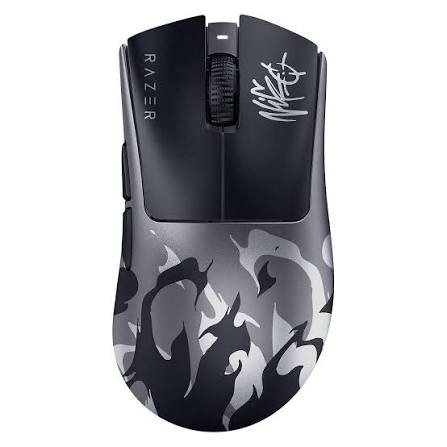
Few gaming mice carry as much history as the DeathAdder line. Razer’s legendary ergonomic design has gone through four generations now, and the V4 Pro launched in July 2025 at $170 is the most technically advanced iteration yet. It introduces a new Focus Pro 45K Gen-2 optical sensor, fourth-generation optical mouse switches, the first optical scroll wheel in a Razer esports mouse, and a 150-hour battery life at 1000 Hz. It’s also 10% lighter than its predecessor, coming in at 56 grams in black.
The external shape is virtually unchanged from the V3 Pro which is a feature, not a limitation. That shape has been validated by millions of users and dozens of pro players.
Key Specifications
| Spec | Detail |
|---|---|
| Sensor | Focus Pro 45K Optical Gen-2 |
| DPI Range | 100–45,000 DPI (1 DPI increments) |
| Max Tracking Speed | 900 IPS |
| Max Acceleration | 85G |
| Weight | 56g (Black) / 57g (White) / 58g (Esports Green) |
| Connectivity | HyperSpeed Wireless Gen-2 (8,000 Hz) |
| Polling Rate | Up to 8,000 Hz (wired and wireless) |
| Battery Life | Up to 150 hours (1,000 Hz) / 22 hours (8,000 Hz) |
| Programmable Buttons | 8 |
| Switch Type | Razer Optical Gen-4 (100M click lifecycle) |
| Scroll Wheel | Optical (new for V4 Pro) |
| Price | ~$170 |
Design & Build Quality
Razer has refined rather than redesigned. The DeathAdder’s right-hand ergonomic hump is instantly recognizable, and the smooth matte finish on the V4 Pro is a departure from the V3 Pro’s lightly textured surface smoother and cleaner in appearance but slightly less grippy without a mouse grip pad. Build quality is solid. The side panels have no flex, clicks feel definitive, and the scroll wheel has none of the wobble or noise issues that plagued some earlier generations.
The new dome-shaped HyperPolling wireless dongle is a practical improvement over the previous trapezoid design weighted to stay in place on a desk and featuring three indicator lights for battery, connection, and polling rate.
Ergonomics & Comfort
The DeathAdder shape is one of the most extensively user-tested ergonomic designs in gaming history, and for good reason. It accommodates a natural hand position for palm grip users, with enough arch to support the full hand and a gentle thumb ledge on the left side. At 56 grams, it’s light enough to feel agile while remaining substantial enough that you don’t feel like you’re chasing it around the pad.
Users with medium to large right hands will find this shape highly comfortable across long sessions. Small-handed users may find the proportions slightly oversized.
Sensor & Tracking Performance
The Focus Pro 45K Gen-2 is Razer’s most advanced sensor at the time of writing and it performs accordingly. At competitive DPI settings (400–1600), tracking is clean and consistent with no observable angle snapping, jitter, or smoothing. At 1600 DPI, motion delay is negligible (under 0.5ms), making it excellent for precision applications.
The motion sync feature in Razer Synapse allows precise alignment of sensor sampling to your display’s refresh rate a niche but real advantage at high refresh rates. Smart Tracking and Dynamic Sensitivity allow granular control over tracking behavior per-game.
Gaming Performance
Outstanding across game genres. In FPS titles, the tracking precision and zero acceleration profile make shot-by-shot consistency excellent. At 8,000 Hz polling in wireless mode (a first for the DeathAdder line), the mouse operates at the same level as leading wired gaming mice. The optical scroll wheel provides crisp, high-reliability tracking with tactile feedback significantly more durable than encoder-based alternatives and precise enough for rapid weapon switching.
The switch to Gen-4 optical switches brings a more audible click compared to the Razer Viper V3 Pro’s quieter actuation. Most users adapt quickly, but if you prefer quiet switches, this is worth knowing.
Productivity Performance
Capable for office use with its 8 programmable buttons, but the shape optimized for palm-grip gaming may not suit everyone for eight-hour desk sessions. The lack of Bluetooth is also a limitation for users juggling multiple devices. The Synapse 4 software handles button remapping adequately, but it’s not as polished for productivity workflows as Logi Options+.
Buttons & Scroll Wheel
Eight buttons: two primary, middle click, two thumb buttons, and three configurable LEDs on the underside that indicate battery, connection status, and polling rate (these are configurable via Synapse). The thumb buttons have a satisfying click with good travel separation. The new optical scroll wheel is a significant quality upgrade smooth, quiet, and reliable.
Battery Life
150 hours at 1,000 Hz makes the DeathAdder V4 Pro one of the longest-lasting gaming mice available. At 8,000 Hz polling, runtime drops to around 22 hours, which remains reasonable. USB-C charging means fast, universal cable compatibility. A quick 15-minute charge restores a meaningful portion of battery.
Connectivity Options
HyperSpeed Wireless Gen-2 only no Bluetooth. This is a significant limitation for users who want multi-device flexibility or wireless connections to laptops without a USB port to spare. For dedicated desktop gaming setups, it’s a non-issue.
Software & Customization
Razer Synapse 4 handles profile creation, DPI staging, button mapping, HyperShift secondary button layers, and motion-related sensor customization. HyperShift effectively doubles your available button count by assigning a secondary function to every button when a held button activates the shift mode. Synapse 4 is cloud-synced, meaning your profiles follow you across machines useful for tournament players. The software is reliable and feature-rich, if occasionally heavyweight in its resource usage.
Real-World Performance
The DeathAdder V4 Pro is the mouse you reach for when you want to compete seriously without any compromise on feel. The 150-hour battery life means you charge it roughly once a week at 1,000 Hz, which is genuinely liberating for a gaming mouse. The ergonomic shape, iconic for good reason, keeps your hand relaxed even during long sessions. In FPS titles specifically, the Focus Pro 45K Gen-2 sensor gives you every possible advantage in tracking fidelity.
Pros
- 150-hour battery life class-leading for an ergonomic gaming mouse
- Focus Pro 45K Gen-2 sensor is precise and consistent
- 8,000 Hz wireless polling included in the box
- First optical scroll wheel in a DeathAdder reliable and tactile
- 56g weight is a meaningful reduction from the V3 Pro
- Synapse 4 HyperShift doubles effective button count
Cons
- No Bluetooth limits multi-device flexibility
- More audible click than some optical-switch mice
- $170 is premium pricing for a 5-button design (excluding the LED indicators)
- Smooth finish can feel slippery without grip tape
Best For
Palm-grip FPS gamers who want a proven ergonomic shape, exceptional battery life, and 8K wireless polling without Bluetooth dependency.
Who Should Avoid It
Users who need multi-device Bluetooth pairing, left-handed users, and casual gamers who don’t need 8K polling.
Final Verdict
The Razer DeathAdder V4 Pro earns its price with meaningful improvements over its predecessor: better sensor, better switches, a better scroll wheel, and 25% more battery life. For serious FPS players who’ve loved the DeathAdder shape, this is an easy recommendation. For those upgrading from the V3 Pro, the improvements are real but measured you’ll need to decide whether they’re worth the cost of a full upgrade.
4. Razer Basilisk Mobile Best Portable Wireless Mouse
Overview
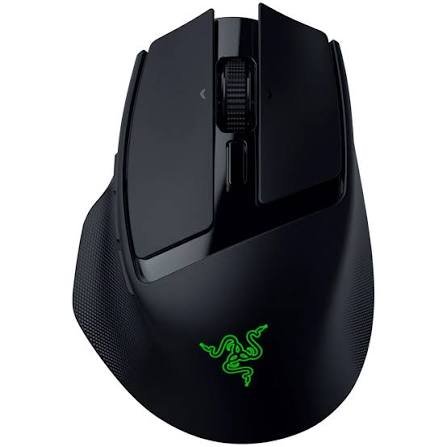
The Razer Basilisk Mobile, launched in May 2025 at $89.99, takes the beloved Basilisk ergonomic shape and shrinks it for on-the-go use. It’s a compact, right-handed wireless mouse designed for gamers who travel people who don’t want to sacrifice Basilisk’s ergonomics or gaming-grade sensor just because they’re away from their desktop setup. The dongle stores neatly in a compartment under the mouse, which is a practical touch for portability.
It pairs Razer’s HyperScroll Technology (including a 4-way tilt scroll wheel with dual scrolling modes), a Focus X 18K optical sensor, Razer Optical Mouse Switches Gen-3, and an impressive battery life for its size.
Key Specifications
| Spec | Detail |
|---|---|
| Sensor | Razer Focus X 18K Optical |
| DPI Range | 100–18,000 DPI |
| Accuracy | 99.4% resolution accuracy |
| Weight | ~77g |
| Connectivity | HyperSpeed 2.4GHz + Bluetooth |
| Polling Rate | 1,000 Hz |
| Battery Life | Up to 200+ hours (Bluetooth) |
| Programmable Buttons | 10 |
| Switch Type | Optical Gen-3 (90M click lifecycle) |
| Scroll Wheel | HyperScroll 4-way tilt (Free-Spin + Tactile modes) |
| Price | ~$90 |
Design & Build Quality
Compact is the operative word. The Basilisk Mobile is noticeably smaller than the full-size Basilisk V3 Pro, which makes it genuinely pocketable and laptop-bag-friendly. The thumb rest a defining Basilisk feature is retained here, providing comfortable thumb support during gaming sessions. Build quality is solid for the price tier: no flex, decent surface materials, and a satisfying scroll wheel mechanism.
The dongle storage compartment under the mouse is a smartly practical feature. No more hunting through your bag for a tiny USB receiver before you can start playing.
Ergonomics & Comfort
The Basilisk Mobile’s compact proportions suit small to medium hands best. Users with large hands may find the shorter body slightly cramped during extended sessions. For travel use which is exactly what this mouse is designed for the size is appropriate. The thumb rest provides meaningful support for long typing and gaming stints in hotel rooms, airports, or LAN event settings.
Sensor & Tracking Performance
The Focus X 18K sensor is a capable mid-tier option. At 18,000 DPI with 99.4% resolution accuracy, it’s more than sufficient for everyday gaming and productivity. It won’t match the AimPoint Pro or Focus Pro 45K in raw competitive specifications, but for the use cases this mouse targets travel gaming, laptop productivity, casual competitive play the tracking is accurate and reliable.
Polling rate is capped at 1,000 Hz, which is perfectly adequate and common at this price and use-case tier.
Gaming Performance
Competent without being cutting-edge. The Focus X 18K tracks faithfully in fast-paced FPS titles, and the 1,000 Hz polling rate keeps latency low enough for most competitive scenarios. The HyperScroll dual-mode wheel is particularly nice for gaming: tactile mode for weapon cycling, free-spin mode for fast map or inventory navigation. The Gen-3 optical switches actuate reliably and resist double-clicking.
For serious esports competition, you’d want the ROG Keris II Ace or DeathAdder V4 Pro. But for travel gaming hotel room sessions, LAN events with laptops, or gaming on a friend’s machine the Basilisk Mobile delivers a genuinely quality experience.
Productivity Performance
Surprisingly strong for a gaming mouse. Ten programmable buttons give you significant shortcut real estate. The dual-mode scroll wheel suits both rapid document browsing and precise paragraph navigation. Bluetooth connectivity means you can pair it directly to a laptop or tablet without using a USB port. The AI Prompt Master feature accessed through Razer Synapse 4 adds smart shortcut functionality that bridges gaming and productivity contexts.
Buttons & Scroll Wheel
Ten programmable buttons the most on this list provide ample customization room for complex gaming macros or productivity shortcuts. The 4-way tilt scroll wheel supports horizontal navigation, which is useful in spreadsheets and video editing timelines. The scroll modes (Free-Spin and Tactile Cycling) are toggled with a button behind the wheel.
Battery Life
Exceptional for a portable gaming mouse. In Bluetooth mode, the Basilisk Mobile pushes past 200 hours of use, which is several weeks of daily usage before you need to plug in. Even in 2.4GHz HyperSpeed mode, runtime is far longer than most desktop gaming mice manage. For travel, this means you likely won’t even pack a charging cable for short trips.
Connectivity Options
Both HyperSpeed 2.4GHz wireless and Bluetooth are supported. A compatible Razer keyboard can share the same HyperSpeed dongle, reducing USB port usage on a laptop. Bluetooth multi-device pairing supports switching between your gaming laptop and, say, a tablet or smartphone.
Software & Customization
Razer Synapse 4 handles all customization. The AI Prompt Master feature is a new addition, allowing AI-assisted shortcut creation and game strategy configuration within Synapse a niche but interesting direction for peripheral software. Button mappings, DPI profiles, and scroll mode settings are all accessible within the app. Razer Synapse for Mac is now available in preview, making this mouse more broadly compatible than previous Basilisk models.
Real-World Performance
The Basilisk Mobile earns its spot on this list by doing exactly what it says: bringing a quality Basilisk experience to portable contexts without charging a premium price for the privilege. It’s the mouse you throw in your bag alongside your laptop and forget about until you reach your destination and realize you have a genuinely capable gaming and productivity tool with 200 hours of battery life.
Pros
- Compact and genuinely portable
- Dongle storage built into the mouse
- 200+ hours battery life in Bluetooth mode
- 10 programmable buttons
- Dual-mode HyperScroll wheel
- $90 price makes it accessible
- Bluetooth + HyperSpeed wireless
Cons
- Focus X 18K sensor is mid-tier not competitive-grade
- Small body may not suit large hands
- 1,000 Hz polling rate maximum
- No RGB lighting (subjective)
- Shape is a scaled-down Basilisk, not a new design for compact use
Best For
Traveling gamers, remote workers, laptop users who want ergonomic comfort without the price of a flagship mouse, and anyone needing a reliable backup mouse.
Who Should Avoid It
Competitive esports players who need cutting-edge sensor specs, users with large hands, and those who prioritize RGB aesthetics.
Final Verdict
At $89.99, the Razer Basilisk Mobile is the best-value portable wireless mouse on the market. It makes sensible compromises sensor ceiling, polling rate, body size to deliver what matters for travel: reliability, battery life, comfort, and Bluetooth flexibility. Recommended without reservation for anyone who games or works away from their desktop.
5. Logitech G PRO X SUPERLIGHT 2 Best Ultra-Lightweight Wireless Mouse for Esports
Overview
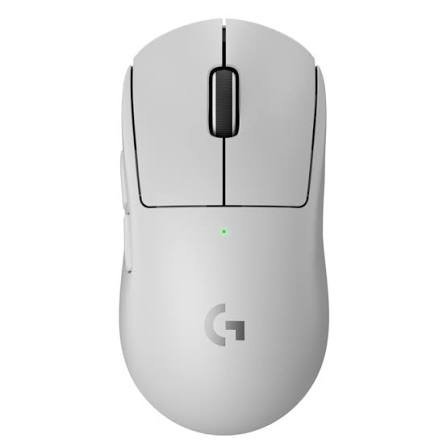
The G PRO X SUPERLIGHT 2 is the distilled, stripped-down expression of what a gaming mouse needs to be. No RGB. Minimal buttons. Symmetrical-leaning body. Just weight, tracking, and clicking done as well as any mouse on the market. Available in black, white, and pink at $159.99, it’s the mouse that a significant portion of the world’s best esports players have trusted in professional competition, and the second generation tightens everything the original nailed while adding USB-C, better battery, and the upgraded HERO 2 sensor.
This is the mouse you buy when you want everything else to get out of the way.
Key Specifications
| Spec | Detail |
|---|---|
| Sensor | HERO 2 Optical (up to 44,000 DPI) |
| Max Tracking Speed | 888 IPS |
| Max Acceleration | 88G |
| Weight | 60g |
| Connectivity | LIGHTSPEED 2.4GHz (up to 8,000 Hz) |
| Polling Rate | Up to 8,000 Hz |
| Battery Life | Up to 95 hours |
| Programmable Buttons | 5 |
| Switch Type | LIGHTFORCE Hybrid Optical-Mechanical |
| Mouse Feet | Zero-additive PTFE |
| Price | ~$160 |
Design & Build Quality
The SUPERLIGHT 2 looks nearly identical to its predecessor the primary external change is the switch from Micro-USB to USB-C. This continuity of design is intentional: Logitech did extensive user research before changing anything about the shape, and the community feedback was essentially “don’t touch it.” The result is a mouse that’s still familiar to anyone who used the original, with internal upgrades that matter.
Build quality is excellent. The symmetrical right-hand-biased body has no rattle, no flex, and no cheap surface textures. The underside features Logitech’s magnetic puck system, which is compatible with the POWERPLAY wireless charging mat and can be swapped for a PTFE-covered alternative for extra glide.
At 60 grams, it’s not the absolute lightest gaming mouse available in 2026, but it’s competitive, and the weight distribution is impressively well-balanced.
Ergonomics & Comfort
The SUPERLIGHT 2’s shape is lower-profile and flatter than the DeathAdder V4 Pro. This makes it best suited to claw grip and fingertip grip styles, though shorter-palmed players using a palm grip also find it comfortable. The right-side bias (a slight contour on the right side) accommodates right-hand use, though the overall shape is close to symmetrical and has been used effectively by some left-handed players.
The absence of rubber side grips means your fingers are resting on the shell directly. This is a preference thing: some users find it cleaner and more direct, others miss the tactile security of textured side panels. Optional grip tape is included in the box.
Sensor & Tracking Performance
The HERO 2 sensor is Logitech’s finest tracking technology and it performs flawlessly at every DPI setting from 400 to 3200 where most users actually play. Zero smoothing, zero filtering, zero acceleration. What you do with your hand is what appears on screen. The 888 IPS tracking speed and 88G acceleration ceiling mean nothing short of a genuinely extreme, physically impossible mouse movement will outrun the sensor.
At 8,000 Hz polling via the LIGHTSPEED Gen-2 receiver, the SUPERLIGHT 2 delivers position updates that match wired performance in any measurable way. Input latency is measured in fractions of a millisecond.
Gaming Performance
Elite. The G PRO X SUPERLIGHT 2 is the choice of dozens of professional esports players across CS2, Valorant, Overwatch 2, and other titles. The combination of 60g weight, HERO 2 tracking accuracy, LIGHTFORCE switches, and 8K polling creates a mouse that genuinely gets out of the way and lets your aim be the variable. There’s no sensation of fighting the mouse, no lag to compensate for, no delay between intent and action.
The LIGHTFORCE hybrid switches deserve specific mention: they combine optical speed (near-instant actuation) with the satisfying, tactile click feel of a mechanical switch. The result is a click that’s both fast and pleasurable a better balance than pure optical switches (which can feel hollow) or traditional mechanical (which accumulate wear and can double-click over time).
Productivity Performance
Minimal. Five buttons offer basic remapping but don’t leave much room for complex shortcut workflows. No Bluetooth means you’ll always need a USB port for the dongle. The shape, while comfortable for gaming, isn’t optimized for all-day desk work. For anyone who also needs their mouse to handle productivity tasks, the MX Master 4 is the better choice.
Buttons & Scroll Wheel
Five buttons: two main clicks, middle click, and two side buttons. No dedicated DPI switch on the mouse body DPI is set through Logitech G HUB software or onboard profiles. The scroll wheel is tactile and precise. No free-spin mode, which is a concession to the esports-focused design philosophy: in competitive gaming, you rarely need to scroll through thousands of lines.
Battery Life
95 hours on a full charge. Among the mice on this list, that sits in the middle, but it’s an enormous improvement over the original SUPERLIGHT’s 70 hours. PowerPlay compatibility (via the included magnetic puck system) means you can use a POWERPLAY charging mat for continuous, cable-free charging during use never seeing a low battery warning again.
USB-C fast charging returns a meaningful charge quickly. Quick 15-minute charges are practical during breaks between sessions.
Connectivity Options
LIGHTSPEED 2.4GHz only. No Bluetooth. This is the same limitation as the DeathAdder V4 Pro and the same reasoning applies: Bluetooth adds weight, complexity, and slightly less consistent latency. For a mouse built purely for gaming performance, the omission is a deliberate design choice.
Software & Customization
Logitech G HUB is well-regarded for its profile management, DPI configuration, button remapping, and report rate settings. Onboard memory stores profiles for tournament use. The calibration tools including surface calibration and independent X/Y axis sensitivity are the most precise available in a consumer peripheral.
Real-World Performance
A week with the SUPERLIGHT 2 is enough to understand why professional players keep coming back to it. The weight disappears. The tracking is transparent. The clicks are satisfying and reliable. In competitive play, you find yourself making small-to-medium corrections you wouldn’t have made on a heavier mouse not because the sensor is different, but because 60 grams just moves differently than 90 or 100 grams.
Pros
- 60g weight enables fast, fluid movement
- HERO 2 sensor is exceptionally accurate at competitive settings
- LIGHTFORCE hybrid switches fast, tactile, and durable
- 95-hour battery life
- POWERPLAY wireless charging mat compatible
- Best-in-class esports heritage trusted by pro players globally
- Excellent G HUB software with deep calibration options
Cons
- No Bluetooth
- Only 5 buttons limits non-gaming use cases
- No onboard RGB (again, by design, but worth noting)
- Claw/fingertip grip orientation not ideal for all palm grip users
- G HUB has had stability issues in the past (now largely resolved)
Best For
Competitive FPS and battle royale gamers who want a proven ultra-lightweight design backed by world-class esports pedigree.
Who Should Avoid It
Productivity users, multi-device switchers, palm grip players with large hands, and anyone who needs more than 5 buttons.
Final Verdict
The Logitech G PRO X SUPERLIGHT 2 continues to be one of the best gaming mice you can buy in 2026 not because it invented something new, but because it executes what matters in competitive gaming with near-perfection. Lightweight, precise, reliable, and backed by the experience of the world’s top esports professionals.
Full Wireless Mouse Comparison Table
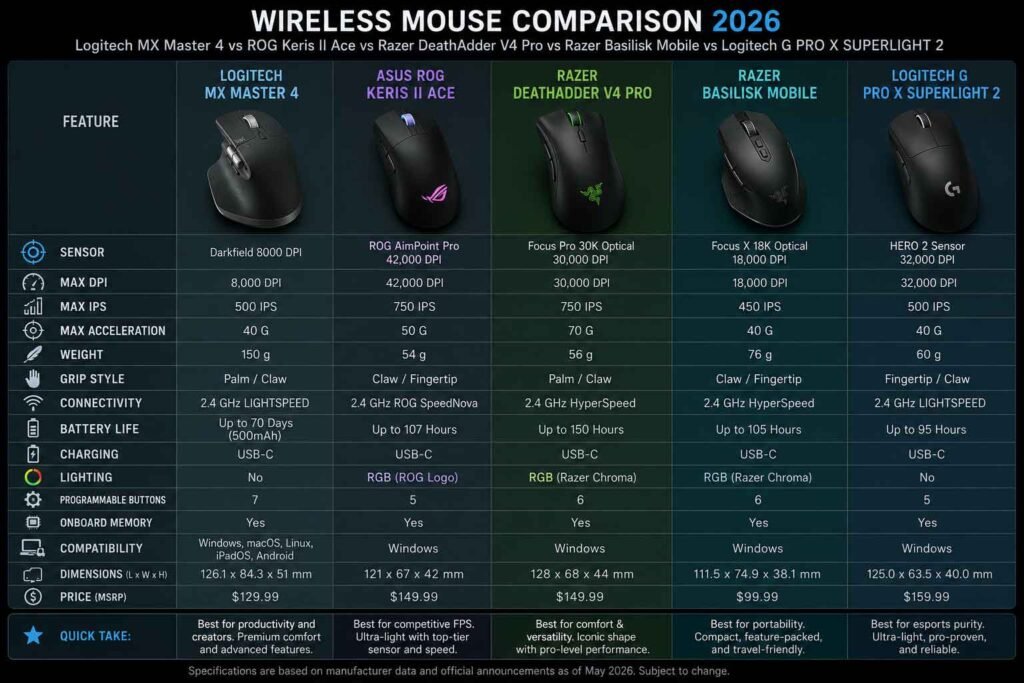
| Category | MX Master 4 | ROG Keris II Ace | DeathAdder V4 Pro | Basilisk Mobile | G PRO X SUPERLIGHT 2 |
|---|---|---|---|---|---|
| Sensor | Darkfield 8K | AimPoint Pro 42K | Focus Pro 45K Gen-2 | Focus X 18K | HERO 2 44K |
| Weight | ~141g | 54g | 56g | ~77g | 60g |
| Battery Life | 70 days | 107 hrs | 150 hrs | 200+ hrs (BT) | 95 hrs |
| Connectivity | Bolt + BT (x3) | 2.4GHz + BT (x3) | 2.4GHz only | 2.4GHz + BT | 2.4GHz only |
| Polling Rate | 250 Hz | 4,000 Hz (wireless) | 8,000 Hz | 1,000 Hz | 8,000 Hz |
| Gaming Perf. | Not Applicable | ⭐⭐⭐⭐⭐ | ⭐⭐⭐⭐⭐ | ⭐⭐⭐ | ⭐⭐⭐⭐⭐ |
| Productivity | ⭐⭐⭐⭐⭐ | ⭐⭐⭐ | ⭐⭐⭐ | ⭐⭐⭐⭐ | ⭐⭐ |
| Comfort | ⭐⭐⭐⭐⭐ | ⭐⭐⭐⭐ | ⭐⭐⭐⭐⭐ | ⭐⭐⭐⭐ | ⭐⭐⭐⭐ |
| Software | ⭐⭐⭐⭐⭐ | ⭐⭐⭐ | ⭐⭐⭐⭐ | ⭐⭐⭐⭐ | ⭐⭐⭐⭐ |
| Value | ⭐⭐⭐⭐ | ⭐⭐⭐⭐ | ⭐⭐⭐ | ⭐⭐⭐⭐⭐ | ⭐⭐⭐⭐ |
| Overall | 9.4/10 | 9.2/10 | 9.1/10 | 8.4/10 | 9.3/10 |
Which Wireless Mouse Should You Buy?
Understanding which mouse is right for you comes down to answering one question honestly: how do I actually use my computer?
Best Overall Wireless Mouse: Logitech MX Master 4 If you spend more time working than gaming, the MX Master 4 is the clear winner. Its combination of ergonomics, MagSpeed scroll wheel, haptic feedback, and multi-device flexibility makes it the most fully-featured wireless mouse available. It costs $120, which is justified for anyone who uses a computer professionally.
Best Gaming Mouse: Razer DeathAdder V4 Pro or Asus ROG Keris II Ace For pure gaming performance, both of these mice are exceptional. The DeathAdder V4 Pro offers the better ergonomics for palm grip players and an unmatched 150-hour battery life. The ROG Keris II Ace wins on polling rate (4,000 Hz wireless vs. 8,000 Hz wired) and lighter weight. Choose the DeathAdder for the shape and battery, and the Keris II Ace for maximum polling performance.
Best Lightweight Mouse: Asus ROG Keris II Ace (54g) At 54 grams with a solid shell (no honeycombing), the Keris II Ace is the lightest mouse on our list while feeling structurally complete. For players who’ve switched to lightweight mice and don’t want to go back, this is the benchmark.
Best Ergonomic Mouse: Logitech MX Master 4 (work) / Razer DeathAdder V4 Pro (gaming) Ergonomics serves different purposes in different contexts. For productivity, the MX Master 4’s sculpted right-hand design and neutral wrist position across long sessions is unmatched. For gaming ergonomics specifically, the DeathAdder’s carefully refined shape for palm grip provides the most natural hand rest among gaming mice.
Best for FPS Games: Logitech G PRO X SUPERLIGHT 2 When the only thing that matters is traceable accuracy and controlled weight, the SUPERLIGHT 2 wins. Its 60-gram body, HERO 2 sensor, LIGHTFORCE switches, and 8K polling are exactly what competitive FPS demands and its esports credentials speak for themselves.
Best for Office Work: Logitech MX Master 4 No contest. The MX Master 4 was built for this, from its MagSpeed scroll wheel to its multi-device switching to its Actions Ring shortcuts. It’s the right tool for knowledge workers.
Best for Content Creators: Logitech MX Master 4 Creative professionals video editors, designers, photographers will find the MagSpeed scroll wheel and horizontal thumb wheel invaluable in applications like Premiere Pro, DaVinci Resolve, Lightroom, and Figma. The haptic feedback when sliders snap to grid values is genuinely useful in precision workflows.
Best for Programming: Logitech MX Master 4 Developers who gesture through large codebases, switch between applications frequently, and use complex keyboard shortcuts will appreciate the MX Master 4’s customizable Actions Ring. Multi-machine workflows via Logi Options+ are a real advantage for engineers who switch between machines.
Best Travel Mouse: Razer Basilisk Mobile Compact, 200+ hour Bluetooth battery life, dongle stored in the mouse, and a comfortable ergonomic design. The Basilisk Mobile is the travel mouse on this list, by design. It earns that title convincingly.
Best Value for Money: Razer Basilisk Mobile At $89.99, the Basilisk Mobile delivers gaming-grade ergonomics, a dual-mode scroll wheel, Bluetooth + 2.4GHz wireless, 10 programmable buttons, and excellent battery life. No mouse on this list delivers more usable features per dollar.
Wireless Mouse Care & Maintenance Tips
Your mouse works harder than most peripherals. Here’s how to keep it performing like new.
Cleaning the Sensor A dirty sensor is the most common cause of inconsistent tracking. Use a cotton swab lightly dampened with isopropyl alcohol (90%+) to gently clean the lens. Never spray liquid directly onto the mouse, and always turn it off before cleaning.
Maintaining Mouse Feet (PTFE Skates) PTFE feet wear down over time, especially if you use a hard surface without a mouse pad. If your mouse starts snagging or feeling rough, replacement feet are usually available from the manufacturer or third-party suppliers. Replacement is straightforward: peel off the old feet, clean the surface, press on the new ones.
Battery Care Lithium-ion batteries in rechargeable mice perform best when kept between 20% and 80% charge for regular storage. Avoid letting the battery drain to zero consistently. Most mice now use charge management circuits that prevent overcharging, but unplugging after a full charge is still a good habit.
Charging Best Practices USB-C cables can experience wear at the connector end. If your mouse charges intermittently, inspect the cable and port for debris or damage before concluding the battery is failing. A small burst of compressed air clears most port debris. Use the cable that came with the mouse for guaranteed compatibility.
Firmware Updates Manufacturers occasionally release firmware updates that improve sensor accuracy, fix polling rate stability issues, or add new software features. Check your mouse’s companion software periodically Logi G HUB, Razer Synapse 4, and Armoury Crate all provide firmware update prompts when connected.
Protecting the Scroll Wheel Dust and debris accumulate in scroll wheel mechanisms over time. If scrolling becomes inconsistent jumping steps or registering unintended inputs a light blast of compressed air directed into the wheel gap often resolves it without disassembly.
Storage Tips If you travel with your mouse, store it in a small pouch or the box it came in. Dropping a mouse repeatedly on hard surfaces damages internal components and sensor mounts over time, even when the external shell looks fine.
Improving Wireless Performance Keep your USB dongle within 1–2 meters of the mouse where possible. The included extension cables and clip-on dongle extenders (present on the ROG Keris II Ace and SUPERLIGHT 2) are worth using placing the dongle at the edge of your desk, near the mouse pad, dramatically reduces potential signal interference from USB 3.0 ports, monitors, and other RF sources.
Frequently Asked Questions
Is a wireless mouse good for gaming? Yes, absolutely. Modern 2.4GHz wireless gaming mice match or exceed wired mice in latency at competitive polling rates. The Asus ROG Keris II Ace at 4,000 Hz and the Logitech G PRO X SUPERLIGHT 2 at 8,000 Hz are used by professional esports players in high-stakes tournament environments. The age of wireless being “too laggy for gaming” is over.
What’s the difference between Bluetooth and 2.4GHz wireless? 2.4GHz via a USB dongle offers lower, more consistent latency (typically 1–2ms) and is the preferred connection type for gaming. Bluetooth sacrifices some latency for convenience: no USB port required, and you can pair to multiple devices (phones, tablets, laptops) simultaneously. Many mice now offer both, letting you choose based on context.
How much DPI do I actually need? Far less than the spec sheets suggest. Most competitive gamers use 400–800 DPI. Office users and designers typically find 800–1600 DPI comfortable. DPI beyond 3200 introduces jitter at most sensor quality levels and reduces usable precision. High DPI maximums are marketing figures what matters is tracking accuracy at your chosen DPI setting.
Are lightweight mice better? Lighter mice reduce fatigue over long sessions and allow faster flicking movements advantages for competitive FPS gaming. But “better” is contextual. Heavier mice feel more grounded and controlled, which some users prefer for precision work or slower-paced gaming. If you’re currently using a mouse over 90 grams and experiencing wrist fatigue, a lighter option is worth trying.
How long do wireless mice last? Most premium mice are rated for 50–100 million switch actuations. In practical terms, this means 5–10 years of daily use for moderate users, with switches being the most common point of failure. Battery lifespan (charge cycles) typically holds up for 2–4 years before capacity degrades noticeably.
Which mouse is best for large hands? The Razer DeathAdder V4 Pro and Logitech MX Master 4 are both designed to accommodate larger hands comfortably. The ROG Keris II Ace is large enough for most palm grip users with medium to large hands. The Razer Basilisk Mobile and G PRO X SUPERLIGHT 2 are more suited to medium hands.
Can I use a gaming mouse for office work? Yes, with some caveats. Gaming mice tend to have fewer macro-friendly buttons than productivity-oriented mice, and their ergonomics optimize for gaming postures rather than all-day desk postures. The Razer DeathAdder V4 Pro and Razer Basilisk Mobile work well as dual-purpose mice. If productivity is your priority, the MX Master 4 is the better tool.
How often should I clean my mouse? Wipe down the surface weekly if you use it daily hand oils, dust, and debris accumulate quickly. Clean the sensor lens monthly with a cotton swab and isopropyl alcohol. Clean the mouse feet quarterly or whenever glide feels inconsistent.
What is polling rate and does it matter? Polling rate is how often the mouse reports its position to your computer per second. Higher polling rates reduce the time between your physical movement and the cursor update on screen. At 1,000 Hz, a position update happens every 1ms. At 8,000 Hz, every 0.125ms. For competitive gaming at high framerates, the difference is perceptible. For office use, 125 Hz is sufficient.
Are rechargeable mice better than mice that use AA batteries? Rechargeable mice (with built-in Li-ion cells and USB-C charging) are more convenient and increasingly offer longer runtimes between charges. AA-battery mice offer easy battery swaps in the field useful if you’re somewhere without easy access to charging. The battery-swappability advantage is largely academic for most users in 2026, as USB-C is ubiquitous.
What mouse should I buy for programming? The Logitech MX Master 4 is the top choice for developers. The Actions Ring, button remapping for IDE shortcuts, MagSpeed scrolling through long files, and multi-machine workflow features make it a productivity powerhouse for coding workflows. The horizontal thumb wheel is also surprisingly useful in split-screen or multi-pane editors.
Do I need a mouse pad? Not strictly required, but strongly recommended. A good mouse pad provides a consistent, low-friction surface that improves tracking accuracy, protects mouse feet from wear, and reduces wrist fatigue. Cloth pads are softer and more forgiving; hard pads offer faster, more consistent glide. If you’re investing in a premium mouse, invest in a good mouse pad too.
What is HyperPolling / HyperSpeed / LIGHTSPEED? These are brand names for proprietary 2.4GHz wireless technologies. Razer’s HyperSpeed Gen-2 powers the DeathAdder V4 Pro at 8,000 Hz. Logitech’s LIGHTSPEED Gen-2 powers the SUPERLIGHT 2. These technologies are each designed to minimize latency and maintain signal reliability in crowded RF environments, such as tournament venues.
Can I use a wireless gaming mouse on any surface? Most optical sensors work on cloth mouse pads, hard mouse pads, wood desks, and laminate surfaces. The ROG Keris II Ace and Logitech MX Master 4 explicitly support glass tracking useful if you work on a glass desk. Sensors generally struggle with mirror-polished surfaces or very dark, light-absorbing materials.
Is it worth spending more than $100 on a wireless mouse? For dedicated users whether competitive gamers or professionals yes. Premium wireless mice offer meaningfully better sensor accuracy, switch longevity, ergonomics, and software ecosystems than budget options. The difference between a $40 wireless mouse and a $120 wireless mouse is significant. The difference between a $120 and a $200 mouse is subtler and more niche.
Final Verdict: Which Wireless Mouse Should You Buy?
Here’s how the five mice land when you step back and look at the full picture.
The Logitech MX Master 4 ($120) is the best wireless mouse for anyone who prioritizes productivity, ergonomics, and intelligent software. It’s the right-hand tool for creative professionals, developers, analysts, and multi-device users. The haptics and Actions Ring are genuine feature additions, not gimmicks. If you spend more time in spreadsheets, browsers, and design apps than in games, this is your mouse.
The Logitech G PRO X SUPERLIGHT 2 ($160) is the best wireless mouse for competitive gaming, full stop. Its 60g weight, HERO 2 sensor, LIGHTFORCE switches, and 8K polling make it a tool that the world’s best esports players trust in competition. If gaming performance is your only metric, this wins.
The Asus ROG Keris II Ace ($159) challenges the SUPERLIGHT 2 in the competitive gaming space with its 4,000 Hz wireless polling, 42,000 DPI AimPoint Pro sensor, and remarkable 107-hour battery life in a 54-gram body. It’s slightly lighter, has Bluetooth, and comes with one of the best sensor packages available. Competitive FPS players chasing the most polling performance in wireless mode should give this serious consideration.
The Razer DeathAdder V4 Pro ($170) is the best wireless ergonomic gaming mouse for palm grip players. Its 150-hour battery life, 8K wireless polling, and the iconic DeathAdder shape make it a compelling choice for anyone who wants a gaming mouse that they can forget to charge for weeks at a time. The lack of Bluetooth is the main limitation.
The Razer Basilisk Mobile ($90) punches well above its price with an ergonomic design, 10 programmable buttons, dual wireless modes, and 200+ hours of Bluetooth battery life in a compact travel-ready form factor. It doesn’t compete with the gaming-spec mice on sensor performance or polling rate, but it doesn’t need to. For travel, remote work, and casual gaming away from your desktop, it’s the best value on this list.
In short:
- Work-from-anywhere → Razer Basilisk Mobile
- Creative professional or developer → Logitech MX Master 4
- Competitive FPS gamer → G PRO X SUPERLIGHT 2 or ROG Keris II Ace
- Ergonomic gaming + marathon battery → Razer DeathAdder V4 Pro
- Best value overall → Razer Basilisk Mobile
- Premium daily driver → Logitech MX Master 4
Whatever you decide, a quality wireless mouse is one of the best investments you can make for your computing setup. You interact with it every minute you’re at a screen it’s worth getting right.
If you want to buy a mechanical keyboard to read this Blog Post